5 Best Free AI Video to Text Converter Tools in 2026: BibiGPT Leads the Pack

Quick answer: The best free AI video to text converter in 2026 is the one that accepts a link or a local file and still gives you a searchable transcript. Paste a URL into BibiGPT for YouTube, TikTok, Bilibili, Douyin, and 30+ other sources; upload MP4/MP3 when there is no link. NoteGPT and Eightify stay useful if you only ever work on YouTube. This page is the video-to-text cluster pillar — pair it with the AI video summary guide when you need chapters, not just raw text.
Get a free transcript first: Paste a YouTube or Bilibili link in the browser — no login.
Table of Contents
- Which Are the Top 5 Free AI Video to Text Converter Tools?
- Why Do You Need an AI Video to Text Converter?
- In-Depth Review of the Top 5 Tools
- How to Convert Video to Text with BibiGPT (Step-by-Step)
- How Do the 5 Tools Compare Feature by Feature?
- Frequently Asked Questions
- Conclusion
Which Are the Top 5 Free AI Video to Text Converter Tools?
The five best free AI video to text converters in 2026 are BibiGPT, NoteGPT, Eightify, ScreenApp, and iWeaver. BibiGPT leads with one-click transcription across 30+ platforms plus AI summarization; the other four each excel in a narrower use case. All five were ranked after hands-on testing in real-world scenarios.
- BibiGPT — Supports 30+ platforms with one-click video transcription and AI-powered summarization. The most comprehensive solution available.
- NoteGPT — YouTube-focused note-taking tool with AI summaries, ideal for academic learning.
- Eightify — Delivers YouTube video summaries in 8 key takeaways for quick content screening.
- ScreenApp — Combines screen recording with real-time transcription, built for meetings.
- iWeaver — AI knowledge management platform that collects and organizes multi-format content.
Why Do You Need an AI Video to Text Converter?
Over 700 million hours of video are uploaded to the internet daily, making manual note-taking from video content practically impossible. AI video to text converter tools automatically extract speech from videos and transform it into structured, searchable text in minutes rather than hours.
Whether you are reviewing meeting recordings, studying online courses, or analyzing competitor content, a reliable video to text converter dramatically improves your productivity. Here is what these tools can do for you:
- Save time: A 30-minute video can be fully transcribed in just 1-2 minutes
- Improve accuracy: Modern AI speech recognition achieves over 95% accuracy, outperforming manual transcription
- Support multiple languages: Automatic detection and transcription for English, Chinese, Japanese, Korean, and more
- Deliver structured output: Beyond raw transcripts, get timestamped summaries, key points, and mind maps
For professionals, content creators, and students alike, mastering a powerful video transcription tool means multiplying your information processing speed several times over.
In-Depth Review of the Top 5 Tools
1. BibiGPT — The Ultimate Cross-Platform Video to Text Converter
BibiGPT is the most feature-complete AI video to text converter available today. Trusted by over 1 million users with over 5 million AI summaries generated, it sets the standard for what a video transcription tool should be.
What makes BibiGPT stand apart from every other tool on this list is its unmatched platform coverage and intelligent processing capabilities:
- 30+ platform support: YouTube, Bilibili, TikTok, podcasts, Vimeo, Xiaohongshu, Kuaishou, and many more. Just paste a link and get results.
- AI-powered smart summaries: Go beyond raw transcription with structured summaries, key point extraction, and mind map generation.
- Full multi-device coverage: Web app, browser extension (Chrome/Firefox/Edge), desktop client (macOS/Windows), and mobile app (iOS/Android).
- Local file upload: Upload audio and video files directly (mp3, mp4, wav, and more), supporting files up to 2GB.
- Multilingual recognition: Automatically detects and transcribes Chinese, English, Japanese, Korean, and other languages. Also supports subtitle translation.
BibiGPT goes beyond simple transcription. Its AI video summarization generates structured insights, while the video-to-article workflow lets content creators repurpose video content into written form with a single click.
For a deeper comparison of YouTube summarization tools, check out our comprehensive guide: Best YouTube AI Video Summary Tools
Best for: Users who need a single tool that handles video content from any platform, in any language.
2. NoteGPT — YouTube Study Notes Made Easy
NoteGPT positions itself as an AI-powered study companion, primarily designed around YouTube video content extraction and note organization.
- Automatically generates text summaries and notes from YouTube videos
- Supports highlight marking and timestamp navigation
- Chrome extension integrates directly into the YouTube player page
- Notes can be exported to Notion and other productivity tools
Limitations: Platform support is narrow, focusing almost exclusively on YouTube. Domestic Chinese platforms like Bilibili and Douyin are not supported. The free tier has notable restrictions on daily usage.
Best for: Students and researchers who primarily consume English-language YouTube content for academic purposes.
3. Eightify — 8-Point YouTube Video Summaries
Eightify specializes in rapid YouTube video summarization, condensing long videos into exactly 8 key takeaways to help users quickly decide whether a video is worth watching in full.
- One-click generation of 8 key points from any YouTube video
- Chrome extension that embeds directly into the YouTube interface
- Clean, minimal interface with a low learning curve
- Supports English and select other languages
Limitations: YouTube-only support with no ability to process local files or videos from other platforms. The fixed 8-point format limits flexibility for videos that need more nuanced summarization.
Best for: Efficiency-focused users who need to quickly screen and filter YouTube content.
4. ScreenApp — Screen Recording Meets AI Transcription
ScreenApp integrates screen recording with AI-powered transcription, creating a seamless workflow where recording automatically becomes searchable text. This makes it particularly valuable for meeting documentation.
- Built-in screen recording with automatic post-recording transcription
- Real-time captions and meeting summary generation
- Keyword search and timestamp-based navigation
- Team collaboration and content sharing features
Limitations: Does not support pasting video URLs for direct transcription. You must record content through the app to get transcripts, which makes it impractical for processing existing online videos.
Best for: Meeting participants and online course attendees who need to record their screen and simultaneously generate transcripts.
5. iWeaver — AI Knowledge Management and Content Organization
iWeaver is a broader AI knowledge management platform that supports collecting content from multiple formats, including video, and organizing it with intelligent categorization and analysis.
- Supports ingesting video, articles, PDFs, and other content types
- AI-powered automatic categorization and tagging
- Knowledge graph and content relationship mapping
- Export to various note-taking tools
Limitations: Video-to-text is just one of many features, and it lacks the specialized depth of purpose-built video transcription tools. The free tier is significantly restricted.
Best for: Knowledge workers who need a unified platform to manage information from diverse content sources.
How to Convert Video to Text with BibiGPT (Step-by-Step)
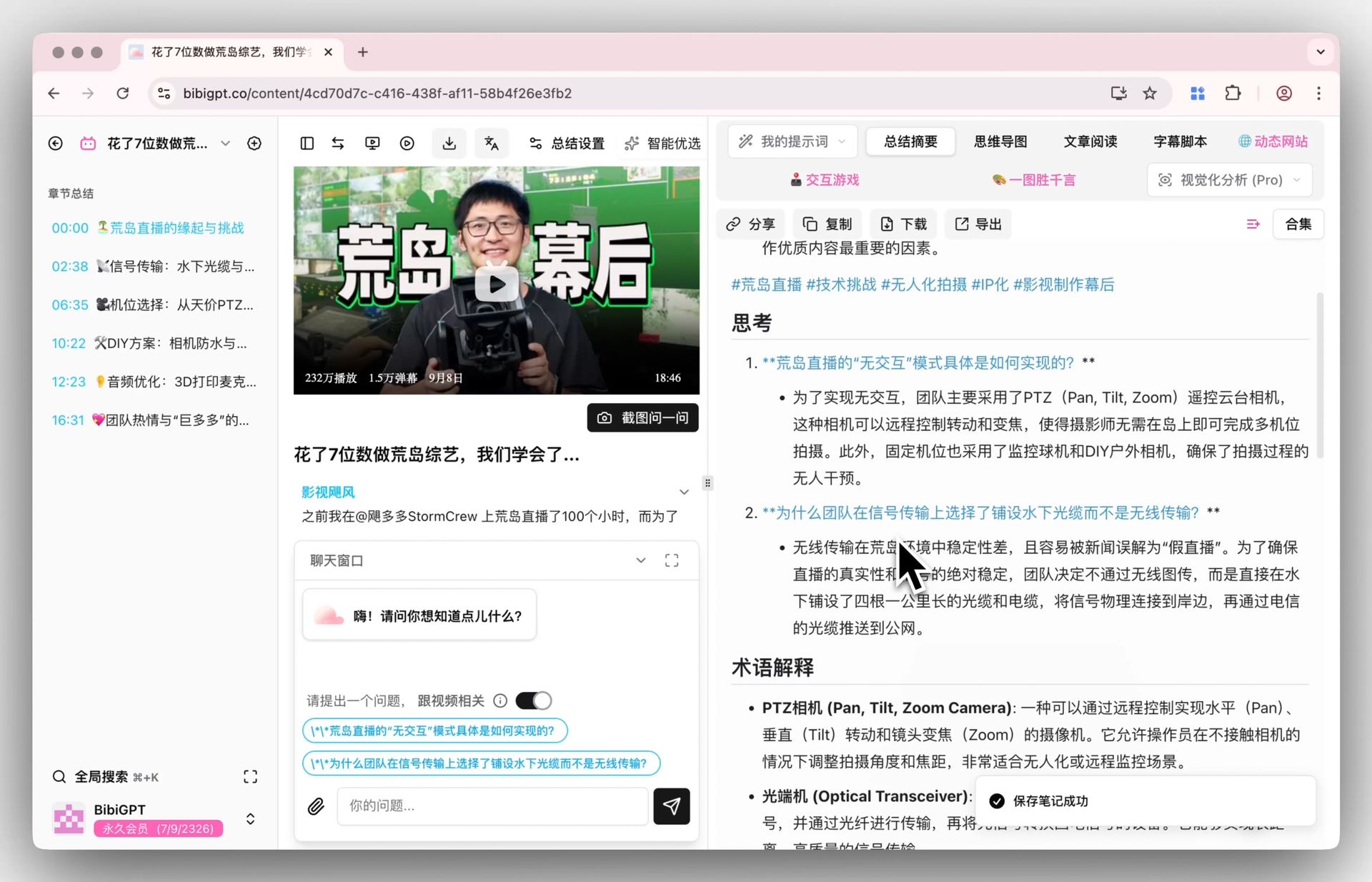
It takes just 3 steps to transform any video into structured text content. Here is the complete workflow demonstrated with a YouTube video.
Step 1: Copy the Video Link
Open YouTube (or Bilibili, TikTok, any of the 30+ supported platforms) and navigate to the video you want to transcribe. Copy the video URL from your browser’s address bar.
Step 2: Paste and Submit
Visit bibigpt.co and paste the video link into the input field. Click submit. BibiGPT will automatically detect the platform and begin processing.
Step 3: Get Your Results
Within 1-2 minutes, BibiGPT will complete the following automatically:
- Extract video subtitles or transcribe audio to produce a full text transcript
- Generate a timestamped, structured summary
- Extract key takeaways and core arguments
You can copy the transcript directly, use the AI dialogue feature to ask follow-up questions about the video content, or export your results as a mind map, Notion note, or article format.
For more on podcast transcription workflows, see: Best Podcast Transcription Tools 2025
How Do the 5 Tools Compare Feature by Feature?
BibiGPT is the only tool of the five that combines broad platform support, transcription, and AI summarization in one place; the rest trade coverage for a single specialty. The side-by-side table below covers platform support, core features, language capabilities, and pricing across all 5 tools to help you make an informed decision.
| Feature | BibiGPT | NoteGPT | Eightify | ScreenApp | iWeaver |
|---|---|---|---|---|---|
| Platforms Supported | 30+ | YouTube only | YouTube only | Screen recording | Multi-source |
| Video to Text | Yes | Yes | Yes | Yes | Yes |
| AI Smart Summary | Yes | Yes | 8-point format | Yes | Yes |
| Mind Map | Yes | No | No | No | Yes |
| Local File Upload | Yes (2GB) | No | No | Via recording | Yes |
| Chinese Platform Support | Bilibili, Douyin, Xiaohongshu | No | No | No | Partial |
| Multilingual Recognition | EN/ZH/JA/KO+ | English-focused | English-focused | Multilingual | Multilingual |
| Browser Extension | Yes | Yes | Yes | Yes | Yes |
| Desktop Client | Yes | No | No | No | No |
| Mobile App | Yes | No | No | No | No |
| Free Tier | Yes | Limited | Limited | Limited | Limited |
Frequently Asked Questions
How accurate are AI video to text converter tools?
Leading AI video to text tools now achieve speech recognition accuracy above 95%. BibiGPT uses advanced AI models for both speech recognition and content understanding. For clearly spoken English or Chinese videos, accuracy typically reaches around 98%. Videos with heavy accents, dialects, or significant background noise will see reduced accuracy, but results still surpass manual transcription.
What is the difference between free and paid plans?
Most tools offer a free trial tier, with paid plans unlocking higher daily limits, longer video support, and advanced features. BibiGPT’s free tier includes basic video-to-text transcription and AI summarization. Upgrading to Plus or Pro unlocks more daily processing credits, support for longer videos, premium AI model selection, and advanced export options.
Which tool is best for YouTube videos specifically?
While Eightify and NoteGPT are YouTube-exclusive tools, BibiGPT offers the most comprehensive YouTube experience plus 30+ additional platforms. If you only ever work with YouTube content, any of the top three will serve you well. But if your needs extend beyond YouTube to include TikTok, podcasts, Bilibili, or local files, BibiGPT is the clear winner.
Can I export transcribed content to note-taking apps?
BibiGPT supports multiple export formats and integrations. Transcriptions and summaries can be copied as plain text or Markdown, and exported directly to Notion, Obsidian, and other note-taking tools. Pro users can also transform video content into articles, PPTs, and other knowledge products.
How long does it take to process a 30-minute video?
Typically 1-3 minutes for complete processing. BibiGPT processes most videos within 1-2 minutes, including subtitle extraction, speech recognition, and AI summary generation. Exact timing depends on video length, network conditions, and server load, but the experience is dramatically faster than manual transcription.
Is there a free online video to text converter that needs no download?
Yes. Web-based tools let you convert video to text right in the browser with nothing to install. BibiGPT runs as a web app where you paste a link or upload a file and get a transcript online, while a desktop client and browser extension are optional extras. For quick, no-install transcription, try the video to text converter or the online video to text tool directly.
Can I convert an MP4 or other local file to text for free?
Yes. Beyond pasting links, you can upload local files such as MP4, MP3, MOV, and WAV (up to 2GB) and get an accurate transcript. This is ideal for downloaded lectures, screen recordings, and meeting captures that never lived on a streaming platform. The free tier covers basic local-file transcription before any upgrade.
Is free video to text transcription accurate enough?
For most clearly spoken content, yes. Modern AI speech recognition reaches roughly 95-98% accuracy on clean English or Chinese audio, far better than rushed manual typing. Heavy accents, overlapping speakers, or loud background noise will lower accuracy, so it is worth spot-checking critical numbers and names against the original audio.
Does the converter support multiple languages?
Yes. A capable video to text converter automatically detects the spoken language and transcribes English, Chinese, Japanese, Korean, and many more without manual setup. BibiGPT also offers subtitle translation, so you can transcribe in one language and read the text in another — useful for studying foreign-language lectures or localizing content.
How do I convert a YouTube video to text for free?
Paste the YouTube URL into a web converter — you do not need to download the file first. BibiGPT’s video to text converter returns a timestamped transcript plus an optional summary. If you only want official captions, a YouTube transcript extractor or the YouTube subtitle downloader cluster is enough.
Can I transcribe TikTok or Bilibili videos, not just YouTube?
Yes, if the tool is actually multi-platform. YouTube-only helpers (Eightify, NoteGPT) will not open a Douyin or Bilibili link. BibiGPT covers TikTok, Douyin, Bilibili, Xiaohongshu, and local files in the same flow — see the TikTok subtitle download guide and the Bilibili transcript comparison.
Conclusion
In 2026, AI video to text converter tools have become essential for anyone serious about learning and productivity. Whether you are working with YouTube tutorials, Bilibili lectures, TikTok content, or local meeting recordings, BibiGPT delivers the most comprehensive solution with its 30+ platform support, intelligent AI summaries, and full multi-device coverage. Trusted by over 1 million users with over 5 million AI summaries generated, BibiGPT is helping more people than ever turn video content into actionable knowledge.
Start your AI efficient learning journey now:
- 🌐 Official Website: https://bibigpt.co/en/new/video?utm_source=growth-pages&utm_medium=blog-inline-cta&utm_campaign=best-free-ai-video-to-text-converter-tools
- 📱 Mobile Download: https://aitodo.co/app
- 💻 Desktop Download: https://aitodo.co/download/desktop
- ✨ Learn More Features: https://aitodo.co/features
— BibiGPT Team
Popular tools
More in this series
- Video to Text Complete Guide (2026 Updated): YouTube Subtitle Download, Cloud Drives, Bilibili Courses & Multi-Source Solutions
- Best Xiaohongshu Video to Text Tool in 2026: BibiGPT Helps You Create Viral Posts Easily!
- AI Subtitle Translation Workflow Guide 2026: Extract, Translate & Hardcode with BibiGPT
- Outils de traduction de sous-titres IA 2026 : 6 plateformes traduire + incruster
- AI Video to SRT is Offline Only — BibiGPT Extracts Subtitles from 30+ Platforms with AI Summary