OpenClaw's YouTube Summary Not Enough? bibigpt-skill AI Highlight Notes for Researchers

Table of Contents
- The Limits of OpenClaw’s Native YouTube Support
- bibigpt-skill’s YouTube Enhancement Capabilities
- AI Highlight Notes: From Summary to Knowledge Graph
- Researcher Workflow: Cross-Video Q&A and Knowledge Integration
- Case Study: Extracting Research Insights from Lex Fridman Interviews
- Complete YouTube Research Workflow Setup
- FAQ
“OpenClaw already summarizes YouTube — why do I need bibigpt-skill?”
Fair question. OpenClaw’s summarize command does work with YouTube. But it only gives you a flat text summary. Fine for casual consumption, but for serious research work, it’s nowhere near enough:
- You don’t know which insights are the genuine “highlight moments”
- You can’t trace “which second of the video did this argument come from”
- You can’t do cross-video semantic Q&A
bibigpt-skill upgrades YouTube summarization from “information retrieval” to “knowledge construction.” This article focuses on YouTube-specific workflows for researchers and deep learners — a different perspective from the learning methodology angle in Feynman Technique + YouTube AI Learning.
The Limits of OpenClaw’s Native YouTube Support
What OpenClaw can do:
- ✅ Output a basic summary (3-5 bullet points)
- ✅ Generate a short keyword list
What OpenClaw cannot do:
- ❌ Identify and extract genuine “highlight moments” (key arguments, quotes, data)
- ❌ Provide clickable timestamps (can’t trace back to original video position)
- ❌ Semantic Q&A across multiple videos
- ❌ Organize videos into sustainable knowledge collections
- ❌ Generate Flashcards for knowledge retention
The core gap: OpenClaw summaries are one-time consumables. bibigpt-skill builds reusable knowledge assets.
bibigpt-skill’s YouTube Enhancement Capabilities
| Feature | OpenClaw Native | bibigpt-skill |
|---|---|---|
| Basic summary | ✅ | ✅ |
| AI Highlight Notes | ❌ | ✅ Key differentiator |
| Timestamp tracing | ❌ | ✅ |
| Cross-video Q&A | ❌ | ✅ |
| Collection summary | ❌ | ✅ |
| Flashcard generation | ❌ | ✅ |
AI Highlight Notes: From Summary to Knowledge Graph
This is bibigpt-skill’s core advantage in the YouTube context.
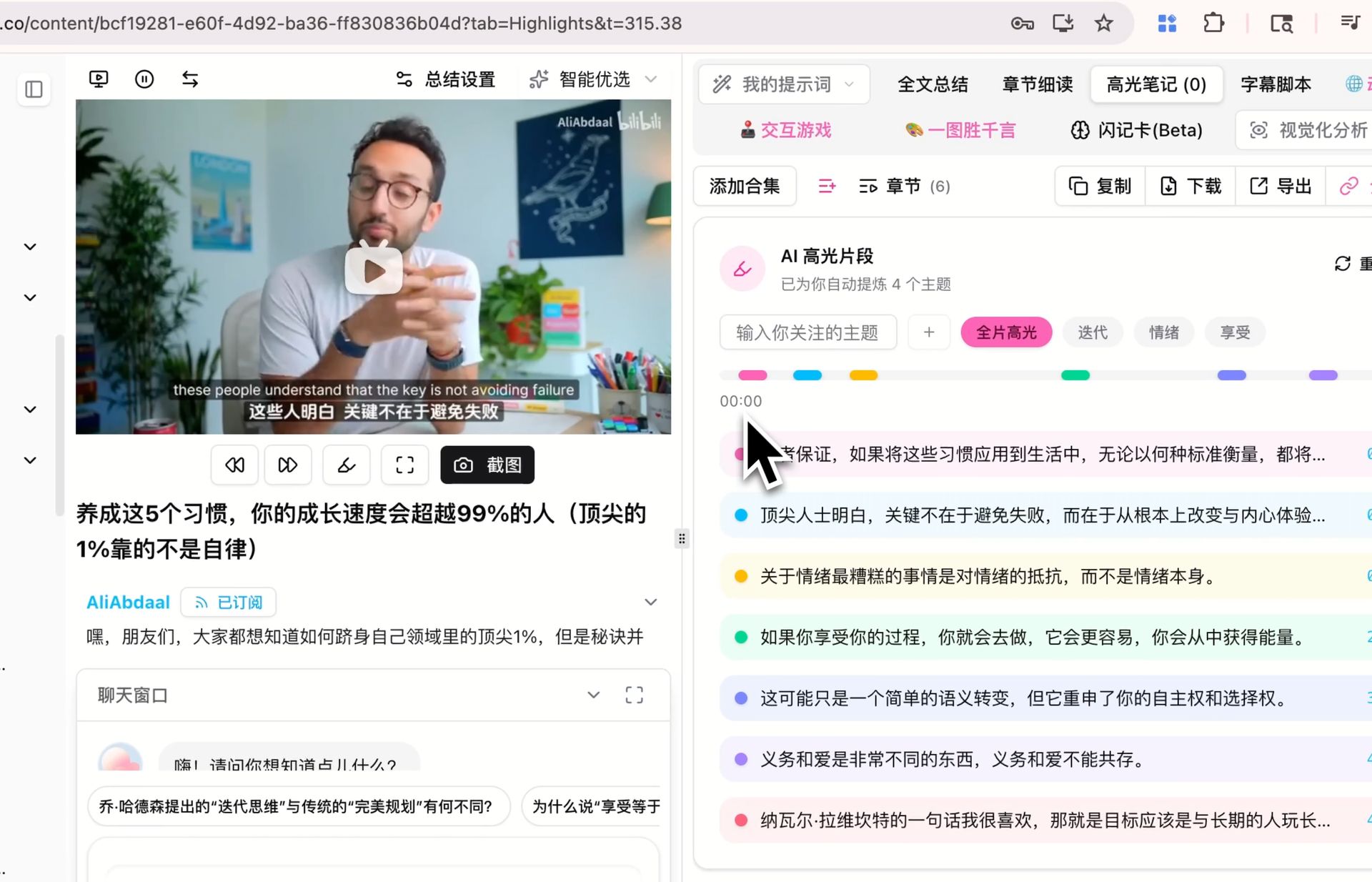
The AI Highlight Notes feature automatically analyzes the entire video, extracts “moments truly worth recording,” and intelligently classifies them by theme:
- Core arguments (labeled “Key Insight”)
- Important data or research citations (labeled “Evidence”)
- Actionable recommendations (labeled “Action Item”)
- Notable quotes (labeled “Quote”)
Used with OpenClaw:
You: Summarize this Lex Fridman interview with Sam Altman,
     focusing on extracting highlight moments and key arguments
OpenClaw: [Calls bibi command]

          📌 AI Highlight Notes (categorized by theme):

          【AI Safety & Alignment】
          - [01:23:45] "The core challenge of alignment isn't technical —
                        it's the plurality of values"
          - [02:15:30] Cited Paul Christiano's research: theoretical
                        limits of RLHF

          【AGI Timeline】
          - [00:45:12] Sam's AGI timeline prediction: within 5-10 years
          - [01:02:33] Debate with LeCun: divergent definitions of
                        general reasoning

          【Actionable Recommendations】
          - [03:10:22] How individuals can stay competitive in the AI wave
Compared to OpenClaw’s native “3-5 bullet points,” this is a qualitative leap.
Researcher Workflow: Cross-Video Q&A and Knowledge Integration
This is the unique scenario for YouTube research workflows — building multiple related videos into a queryable knowledge base.
Use case: Tracking academic discussions in a field
Step 1: Build an "AI Safety Research" collection
You: Add the following Lex Fridman interviews with AI safety researchers
     to the "AI Safety Research" collection:
     - Yoshua Bengio interview (January 2026)
     - Stuart Russell interview (November 2025)
     - Paul Christiano interview (August 2025)

Step 2: Build cross-video Q&A knowledge base
OpenClaw: [Processes 3 videos, each ~2 hours]
          Collection created, processed 367 minutes of content

Step 3: Deep Q&A
You: How do these three researchers differ in their core views
     on "AI alignment"?
OpenClaw + BibiGPT:
   [Semantic analysis across three videos' transcripts]

   Bengio's view: ... (Source: Video A [01:23:45])
   Russell's view: ... (Source: Video B [00:55:30])
   Christiano's view: ... (Source: Video C [02:10:15])

   Core divergence: ...
This cross-video semantic Q&A is completely impossible with OpenClaw’s native tools.
Case Study: Extracting Research Insights from Lex Fridman Interviews
Background: Lex Fridman Podcast is must-watch for AI researchers, but each episode runs 2-4 hours. How can researchers extract value efficiently?
First-hand experience review (tested by an AI researcher):
“I track 3-5 Lex Fridman interviews every week. With OpenClaw’s native summarize, each video only gave me 5-6 points — grossly insufficient. After switching to bibigpt-skill, the AI Highlight Notes categorize 15-20 key segments by theme, each with a timestamp. The game-changer: I can now ask ‘What’s the fundamental difference between Yann LeCun and Hinton’s views on large language models across their videos?’ and get a comparative answer spanning multiple videos. This is an order-of-magnitude improvement for my research.”
— AI Research graduate student (comment from Bilibili user “AI Research Notes”)
Processing data:
- 5 Lex Fridman interview videos, average 2.8 hours each
- bibigpt-skill processing time: ~35 minutes (all 5)
- Generated: ~8,000 words of structured highlight notes + cross-video knowledge base
- Time saved: ~12 hours of viewing → 1.5 hours of reading + targeted lookup
Complete YouTube Research Workflow Setup
# Install BibiGPT Desktop + bibigpt-skill
brew install --cask bibigpt
npx skills add JimmyLv/bibigpt-skill
bibi auth check
Weekly research digest:
Every Friday afternoon:
You: Summarize this week's new videos from my subscribed YouTube channels,
     extract highlight notes by theme, flag key data and citations
     useful for my research/papers

OpenClaw:
  Processing this week's new videos...
  [Batch calls to bibi command]

  This week's research digest:

  📍 AI Safety (3 new videos)
  - Key finding: xxx [Video A, 01:23:45]
  - Important data: xxx [Video B, 00:34:12]
Integration with research tools:
- Obsidian (Markdown + backlinks, build research knowledge graphs)
- Notion (database view, manage by research project)
- Readwise (structured highlights, integrated with other reading)
FAQ
Q1: What’s the fundamental difference between bibigpt-skill’s YouTube summary and OpenClaw’s native summary?
A: The most fundamental difference is depth. OpenClaw native gives you a flat summary (essentially extracting a table of contents). bibigpt-skill gives you theme-categorized highlight notes + timestamps + cross-video Q&A capabilities (essentially a searchable research database).
Q2: How does AI Highlight Notes determine which moments are “highlights”?
A: BibiGPT’s AI model analyzes speaker tone changes (emphasis, pauses), information density (appearance of data/citations), and key argumentative turning points. This is closer to human information judgment than simple keyword extraction.
Q3: What’s the maximum YouTube video length it can handle?
A: Supports videos up to 4 hours long. For extra-long content (like Lex Fridman’s 3+ hour interviews), chapter mode is recommended — the system processes segments by the video’s built-in chapters.
Q4: Can highlight notes be exported to Anki?
A: Yes. BibiGPT’s Flashcard feature automatically generates Q&A cards from highlight notes, with export to Anki-compatible CSV format. Perfect for researchers who need long-term memory of key concepts.
Q5: Does it support YouTube Shorts?
A: Yes, but Shorts are typically under 60 seconds. AI Highlight Notes works best on longer videos (>10 minutes).
Start building your YouTube research knowledge base with BibiGPT now:
- 🌐 Official Website: https://bibigpt.co/en/desktop?utm_source=growth-pages&utm_medium=blog-inline-cta&utm_campaign=openclaw-youtube-bibigpt-skill-ai-highlight-research-workflow-2026
- 📱 Mobile Download: https://aitodo.co/app
- 💻 Desktop Download: https://aitodo.co/download/desktop
- ✨ Learn More Features: https://aitodo.co/features
BibiGPT Team
Popular tools
More in this series
- AI Competitive Intelligence Workflow: Build Industry Monitoring with BibiGPT Video Summaries
- Lessons From Shipping BiliGPT: Two Cold-Start Growth Tactics Behind a GPT-3 Side Project
- [BibiGPT Growth Series] Episode 1 | How AI Summaries for Bilibili Were Born
- BibiGPT Advanced Guide 2026: Download + AI-Summarize Videos from WeChat Channels, RedNote, TikTok, and Enterprise Intranet Sites
- Chat with Any Video: How to Ask AI Questions About Videos Instead of Watching the Whole Thing (2026)