Gemini 3.6 Flash Is Faster and Cheaper: Real-World Hands-On to Summarize Video, Plus 3 Limits (August 2026)

Gemini 3.6 Flash Is Faster and Cheaper: Real-World Hands-On to Summarize Video, Plus 3 Limits (August 2026)
Quick answer: Gemini 3.6 Flash can read a video you already uploaded, but it cannot fetch a YouTube/Bilibili link, cannot emit clickable timestamps, and misses on-screen text unless you add a visual pass. If you want a timestamped summary from a URL today, paste it into the AI video summarizer or the free in-browser video summarizer for a local file.
Gemini 3.6 Flash launched on July 21, 2026, positioned as “faster, cheaper, natively multimodal” — it can read text, images, video, and audio directly. For anyone who processes long videos every day, that is good news. But use it “out of the box” to summarize video and you quickly run into 3 limits you cannot avoid. As of August 2026, this post lays out the real hands-on experience and those limits in one place.
:::note September 2026 generation note Google has since shipped Gemini 3.8 Flash (September 2, 2026) as a newer Flash generation. 3.6 Flash is still the cheaper daily workhorse this article measured. The three out-of-the-box limits below still apply if you send a raw video file to the model with no subtitle retrieval or visual pass. :::
What Gemini 3.6 Flash Actually Changed
Gemini 3.6 Flash is a multimodal model built for high cost-efficiency: a 1-million-token context window, native support for text / images / video / audio / PDF, and a run speed of roughly 280 tokens per second — faster and cheaper than its predecessor. It is not “a smarter reasoning model” — it is “a more affordable daily workhorse.”
According to 9to5Google’s launch report, Gemini 3.6 Flash debuted alongside 3.5 Flash-Lite on July 21, 2026, and uses about 17% fewer output tokens than its predecessor on multi-step tasks. Per Artificial Analysis’s benchmark, it generates at roughly 280 tokens per second, putting it on the faster end of its class. Google DeepMind’s model card confirms it natively accepts text, images, video, audio, and PDFs, with a context window of 1 million tokens.
The same event also introduced a flashier release, Gemini Omni Flash: it unifies text, images, audio, and video in a single model and can output 10-second clips, with API access coming later. For the job of actually understanding video, what matters here is 3.6 Flash’s multimodal input capability.
Why This Update Is Genuinely Good News for Video Summary
The reason is simple: the most expensive step in any video summary is getting the model to “understand” a long, messy piece of content. A faster, cheaper model drives down the unit cost of that exact step — which, for the first time, makes summarizing long videos in bulk actually pencil out.
Summarizing a two-hour keynote or earnings call with a large model used to be a hard sell — token cost and wait time both worked against you. Now that same job is faster and cheaper, which means you can summarize more content, and longer content, without first mentally weighing “is this worth burning compute on.” That also lines up with a truth that gets overlooked: most of the time we summarize first and decide whether the two-hour watch is worth it afterward — not the other way around.
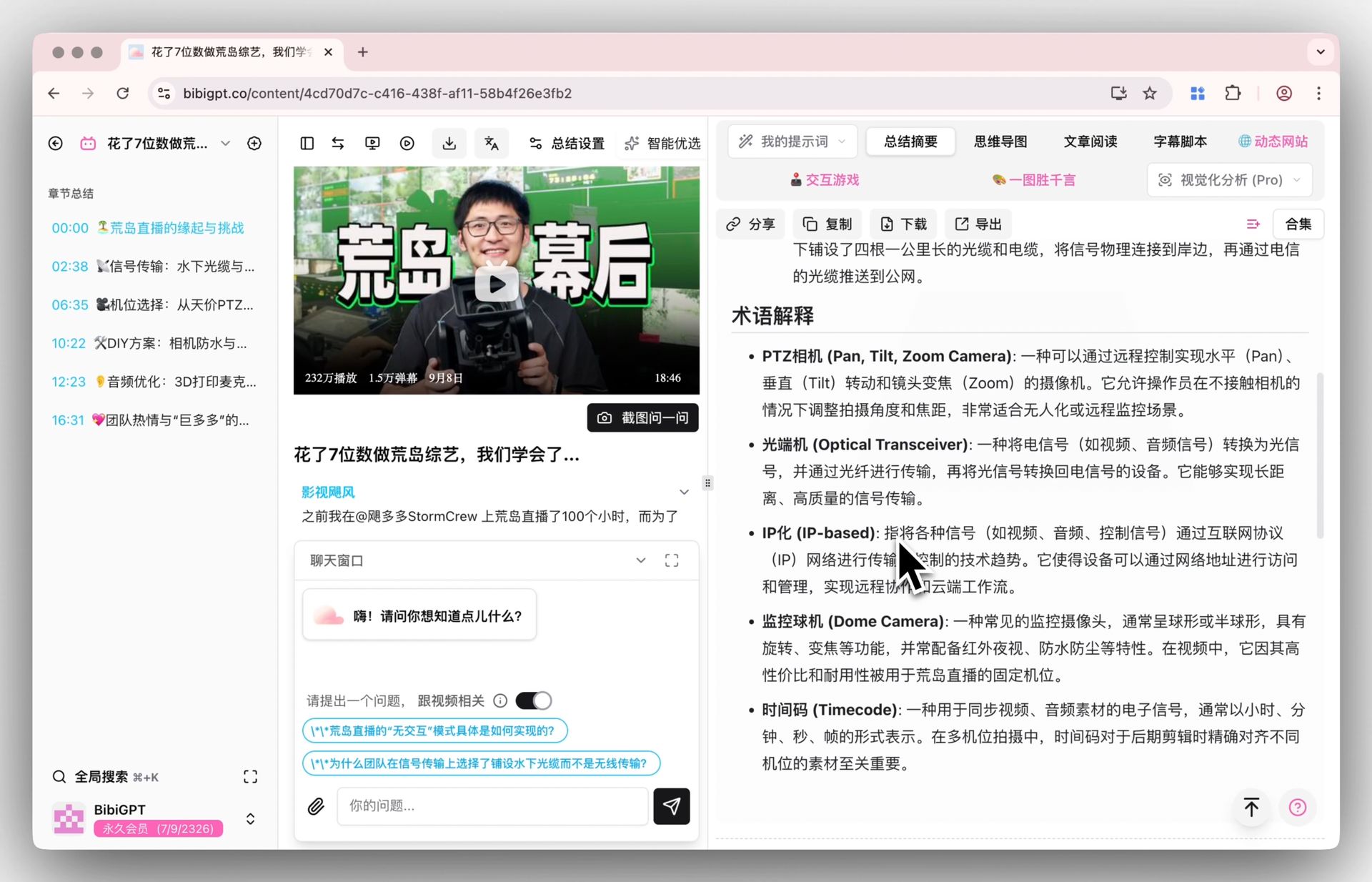
To see the full “paste a link → structured takeaways” flow in action, watch the demo below:
Video: AI video summary workflow demo — paste a link and get timestamped takeaways, a mind map, and a follow-up Q&A, all in one pass.
Practical rule: A faster, cheaper model only saves money on the “reasoning” step. Whether a video gets understood at all depends on what happens before that — subtitles, frame extraction, cross-platform retrieval.
What Are the Real Limits of Using Gemini 3.6 Flash Out of the Box?
The three real limits are: it cannot fetch videos from platforms itself, it has no timestamped output for jumping back to the source, and it offers no batch or knowledge-management workflow. Being able to read video is not the same as being able to drop a Bilibili or YouTube link straight into the model and get a summary back — hands-on testing hits all three.
Limit 1: It cannot fetch the video itself. For the model to read a video, you first need to download it, cut it, and upload it. A 2-hour video can easily run several gigabytes, and each platform (Bilibili, Douyin, Xiaohongshu, podcasts) has its own retrieval method — the model does not handle this grunt work.
Limit 2: What comes out is a wall of text, not a navigable structure. Ask the model directly to “summarize this video” and you typically get a flat block of prose. It struggles to reliably produce timestamped, clickable, fully searchable structured takeaways — which is exactly the format that is most useful for review and repurposing.
Limit 3: On-screen information is easy to miss. Whiteboard text in a lecture, charts in an earnings call, a quick on-screen step in a tutorial — information that exists only visually, not in the audio, is easy for a generic prompt to skip over. Catching it reliably requires dedicated visual analysis of key frames.
The image below shows what “visual analysis of key frames” looks like in practice — the model does not just listen, it also reads the charts and text on screen:
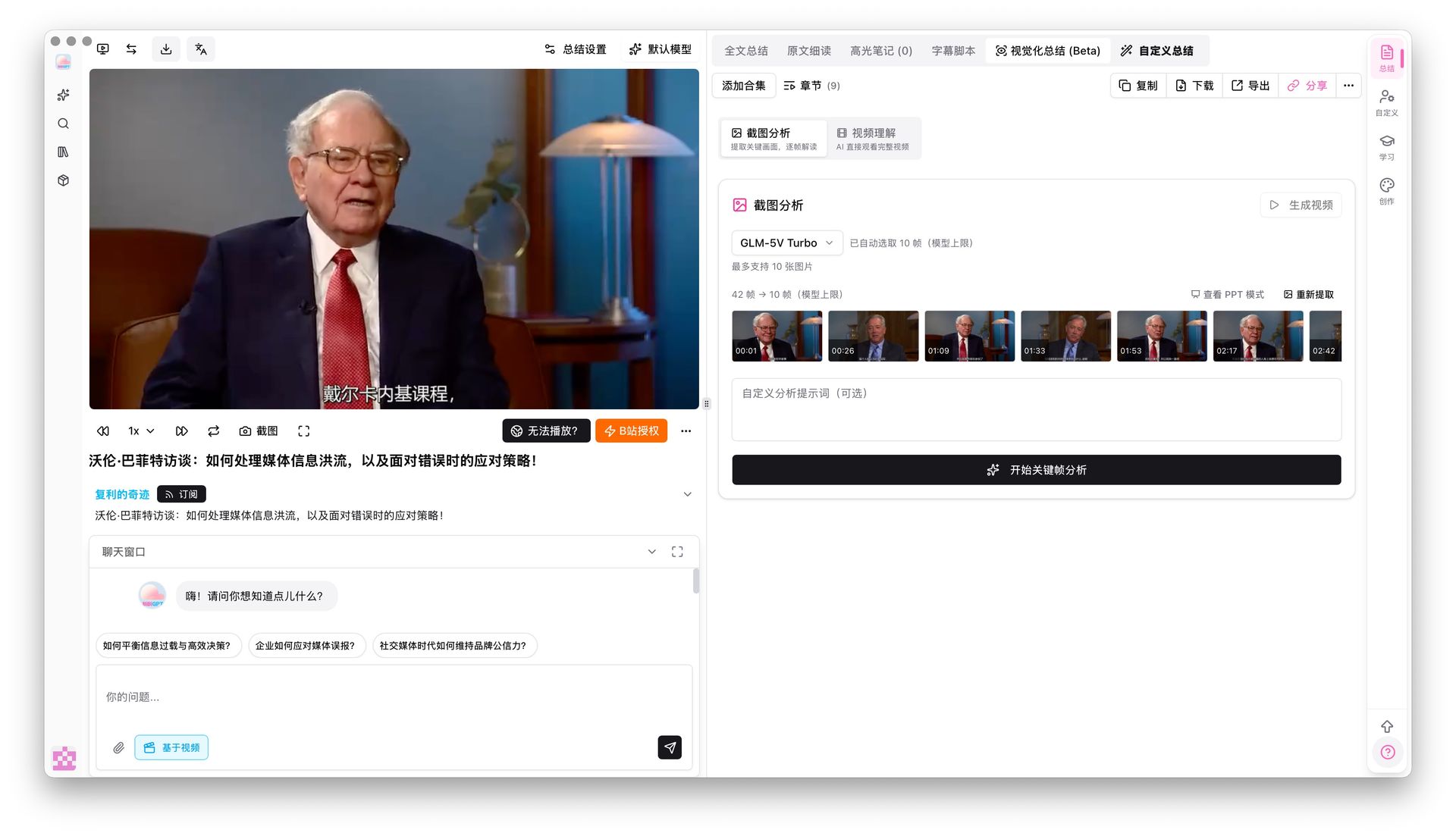
Screenshot: BibiGPT’s key-frame visual analysis feature in action, folding information that exists only on screen into the summary.
Practical rule: To judge whether a “video-capable model” is actually good enough, do not ask whether it supports video — ask whether it can output timestamped, clickable, searchable structured text.
How Do You Turn a Video Into Readable Takeaways Today?
Three ways work right now: paste the link into a tool that handles retrieval and structuring for you, upload local files for transcription plus summary, or wire a skill into your AI agent for batch processing. Rather than agonizing over which model to use, get the “one link → readable takeaways” path working first — as of August 2026:
- Paste the link directly and let a tool handle the grunt work. Paste a Bilibili / YouTube / podcast link into BibiGPT, and subtitle retrieval, frame extraction, and cross-platform handling all get done before the model even sees it — what you get back is a timestamped, structured summary, not a wall of text.
- Let the summary act as a “watch gatekeeper.” Spend 30 seconds reading the takeaways first, then decide whether the two-hour watch is worth it — put the AI summary before the watch, not after.
- When you need to repurpose content, convert it to an article or mind map in one click. Use a mind map for review, rewrite it into an article for your newsletter or social post, export to Markdown into your notes — the summary is just the starting point.
The mind map below is the same summary reshaped into a form built for review:
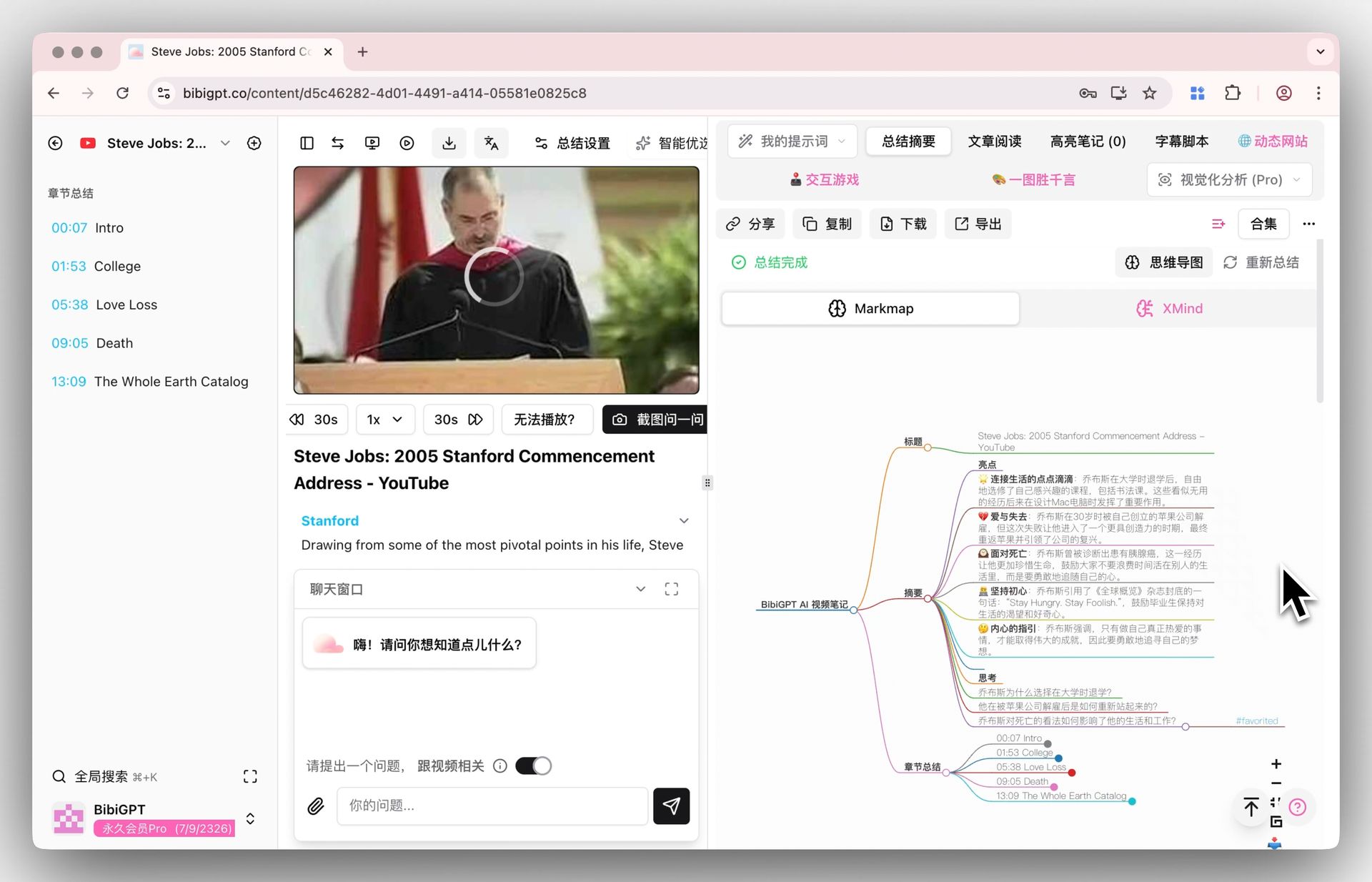
Screenshot: BibiGPT generates a mind map from video takeaways in one click, with nodes that jump back to the matching timestamp in the original video.
BibiGPT supports 30+ platforms including YouTube, Bilibili, Douyin, TikTok, Xiaohongshu, and podcasts — paste a link and get a summary in one click, with several leading AI models intelligently matched to different tasks. To date, it has served over 1 million users and generated more than 5 million AI summaries. Try it directly at BibiGPT’s smart deep summary — just paste a link and see.
Our Take: The Multimodal Input Layer Is the Next Battleground
Models keep getting faster and cheaper, and what that really means is not “whose model is strongest” — it is that reliably feeding audio and video into a workflow has, for the first time, become the actual bottleneck. This generation of productivity and note-taking agents defaults to text-only input; whichever one reads audio and video natively first wins the three highest-frequency scenarios: meetings, online classes, and podcasts.
Here are two predictions we are willing to be proven wrong on — we will come back in a year to check the score:
- Prediction 1: If mainstream productivity / note-taking agents still cannot natively read audio and video by June 2027 (still requiring you to manually transcribe to text first), then this wave of “multimodal models” will have generated buzz without real adoption. If reality proves us wrong by then, we got it wrong.
- Prediction 2: Within the next 12 months, competition among video summary products will shift from “which model are you using” to “whose subtitle retrieval and cross-platform fetching is more reliable.” If everyone is still racing model benchmark scores by August 2027, count this prediction wrong.
Full disclosure: BibiGPT is exactly this “input layer” — our stake overlaps with the judgment above, so weigh it accordingly. But we are willing to state it plainly and put a deadline on it, precisely so it can be checked.
Practical rule: Whoever natively feeds audio and video into the workflow first wins the three highest-frequency scenarios — meetings, online classes, podcasts — and that will decide the race sooner than “a smarter agent” will.
FAQ
Can Gemini 3.6 Flash directly summarize Bilibili / YouTube videos? The model itself can read video, but you first have to download, cut, and upload the video file yourself. For “paste a link, get a summary,” you still need a layer that handles subtitle retrieval and cross-platform adaptation.
When was Gemini 3.6 Flash released? July 21, 2026, alongside Gemini 3.5 Flash-Lite, positioned as faster, cheaper, and natively multimodal.
What is the difference between using BibiGPT and using Gemini directly? Gemini is the model layer, responsible for “understanding.” BibiGPT is the full pipeline built on top of the model, responsible for turning a link into a timestamped, searchable, exportable structured output, and handling subtitle retrieval and visual analysis across 30+ platforms.
Can charts and whiteboard text in a video be captured in the summary? Speech recognition alone will miss them. You need dedicated visual analysis of key frames to fold information that exists only on screen into the summary.
Final Thoughts
Gemini 3.6 Flash getting faster and cheaper drives down the “reasoning” cost of video summary — that is genuinely good news. But whether a video gets truly understood depends on what happens before the model: subtitles, frame extraction, cross-platform retrieval, visual analysis. The more general-purpose the model gets, the more this “input layer” stands out as where the value is.
Rather than waiting for an even stronger model, it is worth getting the “paste a link → readable takeaways” path working smoothly right now.
BibiGPT Team
Popular tools
More in this series
- GPT-Transcribe vs Whisper vs Grok Voice 2.0 vs MAI-Transcribe:2026 语音转文字模型怎么选
- Apple iOS 27 Opens Third-Party AI: The Era of Switchable Assistants Is Here — How to Choose for Audio and Video (2026)
- DeepSeek R1 + BibiGPT: A Practical Guide to AI-Powered Audio/Video Understanding in 2025
- DeepSeek-V4 jest tu! BibiGPT wprowadza cztery nowe modele + 1M kontekst pierwszego dnia — streszczanie wideo i podcastów AI właśnie weszło na wyższy poziom
- BibiGPT vs DeepSeek-V4 + Granite Speech Plus 2026: Self-Hosted Open Source vs Productized Stack
Zobacz wszystkie artykuły (7) w temacie Aktualizacje modeli →