Parakeet vs Whisper: The 2026 Open-Source Transcription Showdown (Real-World Benchmark)

Parakeet vs Whisper: The 2026 Open-Source Transcription Showdown (Real-World Benchmark)
Pick Parakeet for English speed, Whisper for 99+ languages — or skip the model lottery and use a tool that lets you switch engines. NVIDIA’s Parakeet TDT 0.6B currently leads English accuracy (~6.05% WER) and is dozens of times faster; Whisper large-v3 still wins on language coverage. The rest of this guide unpacks accuracy, speed, and language, then shows how to keep both options in one video-to-text workflow.
You drag a two-hour podcast into a transcription tool, pour a coffee, and come back expecting a clean transcript—only to spot the guest’s name misspelled right at the top, followed by a key number transcribed as something else entirely, flipping the meaning of an entire conclusion. Now you either replay the original audio line by line to fix it, or risk running with the wrong version.
What you’re actually facing here isn’t “is transcription fast enough”—it’s a model-selection decision: between Parakeet and Whisper, the two most dominant open-source transcription models right now, which one should you trust with the audio and video? One is NVIDIA’s open-source challenger that landed in 2025 and shot straight to the top of the leaderboard; the other has ruled the space for three years and become nearly synonymous with “speech-to-text.”
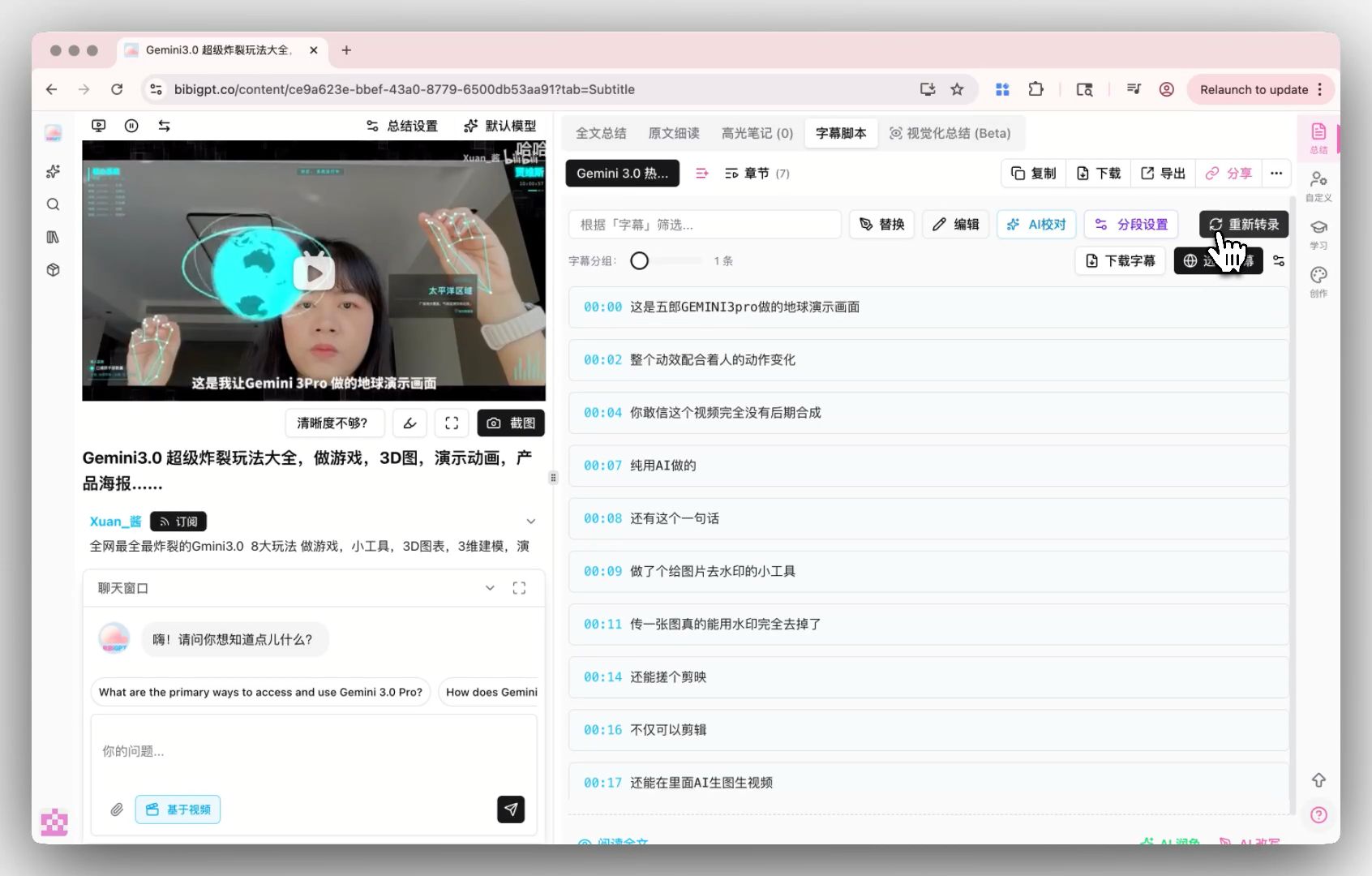
Here’s what that looks like in practice—in BibiGPT, you get to choose which transcription engine does the work:
Screenshot: BibiGPT · Custom transcription engine demo
Why transcription accuracy suddenly became non-negotiable
Transcription accuracy became a hard requirement because the transcript stopped being a “supporting document” and turned into a primary asset—you use it for notes, feed it to AI for summaries, generate subtitles from it, and turn it into articles. Any error anywhere in that chain gets amplified.
People used to tolerate transcription mistakes because a transcript was just “roughly right.” But workflows have changed: subtitles get burned in and published directly, transcripts get handed to large language models for summarization and rewriting, meeting notes get distributed automatically. At that point a single misrecognized word isn’t just “a bit awkward”—it propagates straight through the automated pipeline. A wrong number ends up in the meeting notes, a wrong term ends up in the article, a wrong name ends up in the knowledge base.
The most common way to measure transcription accuracy is Word Error Rate (WER): count how many substitutions, deletions, and insertions it takes to turn the machine’s output into the correct text, then divide by the total word count of the reference—the lower the number, the more accurate (definition via Wikipedia’s Word error rate). But WER has a long-underrated flaw—it treats every word equally. Misrecognizing a filler word and misrecognizing a person’s name cost exactly the same in WER, but for the person reading the transcript, those two kinds of errors are worlds apart in consequence.
Practical rule: When judging transcription accuracy, ask “what got it wrong” before “how many did it get wrong”—one wrong name or number costs far more than ten wrong filler words.
Who is Parakeet: the story behind NVIDIA’s open-source transcription challenger
Parakeet is an English transcription model NVIDIA open-sourced in May 2025—with a compact 600-million-parameter footprint, it climbed straight to the top of HuggingFace’s Open ASR leaderboard with a 6.05% WER.
Its biggest strength isn’t accuracy—it’s speed. According to NVIDIA’s official model card, Parakeet TDT 0.6B v2 posts an RTFx (real-time speed factor) of up to 3380 on the leaderboard, meaning it can process an hour of audio in a matter of seconds—dozens of times faster than comparable solutions. It also comes with word-level timestamps and automatic punctuation built in, which makes it especially friendly for subtitle work—it can handle audio segments up to roughly 24 minutes long in a single pass.
The trade-off is just as clear: the original Parakeet v2 only understands English. Its vocabulary simply doesn’t cover non-Latin scripts like Chinese or Japanese—feed it a Chinese podcast and the output is essentially unusable. (The later v3 release extended language support to 25 European languages, but still leaves out Chinese, Japanese, and Korean.)
For English content where speed matters (bulk transcription, GPU servers, running locally on Apple Silicon), Parakeet is currently about the best value open-source option out there.
Why Whisper is still everyone’s default pick
Whisper remains the default choice for a lot of people, and there’s really one reason: it understands almost every language.
OpenAI’s Whisper large-v3 has 1.55 billion parameters, supports 99+ languages, and posts roughly 7.4% average WER on mixed benchmarks. Its English accuracy trails Parakeet slightly, but it wins on universality—Chinese, Japanese, Korean, accented English, mixed-language meetings, it delivers usable results across the board. The ecosystem is also more mature: from the official open-source repo to a whole family of derivatives (distil-whisper, whisper.cpp, turbo), nearly every platform already has ready-made integrations.
In other words, Parakeet is the “English specialist champion,” and Whisper is the “all-rounder.” If the source material is a mixed bag—a Bilibili video today, an English podcast tomorrow, a Japanese interview the day after—Whisper’s language coverage saves you the hassle of “figure out what language this is, then pick the right model.”
Want to see the real difference between the two? This video runs the same material through both, which is a lot more intuitive than reading a spec sheet:
Video source: YouTube · Parakeet v2 vs Whisper hands-on comparison
Parakeet vs Whisper benchmark: accuracy, speed, and language
The short version: Parakeet wins on English accuracy and speed; Whisper wins on language coverage and ecosystem maturity. The table below lines up the key dimensions.
| Dimension | Parakeet TDT 0.6B v2 | Whisper large-v3 |
|---|---|---|
| English WER | ~6.05% (leaderboard #1) | ~7.4% (mixed benchmark) |
| Speed (RTFx) | ~3380, extremely fast | Noticeably slower |
| Language coverage | English only (v3 extends to 25 European languages) | 99+ languages |
| Parameter size | 600 million | 1.55 billion |
| Best fit | English, bulk volume, speed-critical | Multilingual, mixed source material |
Data sources: HuggingFace Open ASR leaderboard and both models’ official model cards; for a broader speed and language coverage comparison, see Northflank’s 2026 open-source speech-to-text benchmark. Worth noting: these leaderboard numbers come from standard English datasets—your actual gap will look different once you factor in accents, industry jargon, or noisy real-world recordings.
Decision filter: English-only content where speed is everything → Parakeet; multilingual coverage with mixed source material → Whisper.
Who should pick what: transcription decisions for three types of users
Whether you should pick Parakeet or Whisper comes down to who you are, what language the material is in, and how much patience you have for setting up an environment. Here’s the breakdown by user type.
- English content creators / developers: Your material is mostly English, you have a GPU or Apple Silicon on hand, you’re transcribing in bulk, and speed matters → go with Parakeet directly. Both accuracy and throughput are currently best-in-class.
- Multilingual learners / content workers: You’re dealing with Chinese, Japanese, Korean, or mixed-language material → Whisper is the only solid option. Parakeet simply doesn’t cover the languages at this stage.
- Everyday users who don’t want to touch the command line: You don’t want to set up an environment, and you don’t want to decide “which model should I use today” every time → use a product that’s already packaged this for you and still lets you switch engines, turning model selection into a simple dropdown.
The image below shows one piece of what makes a transcript actually usable—segmentation settings determine whether a transcript is readable or not:
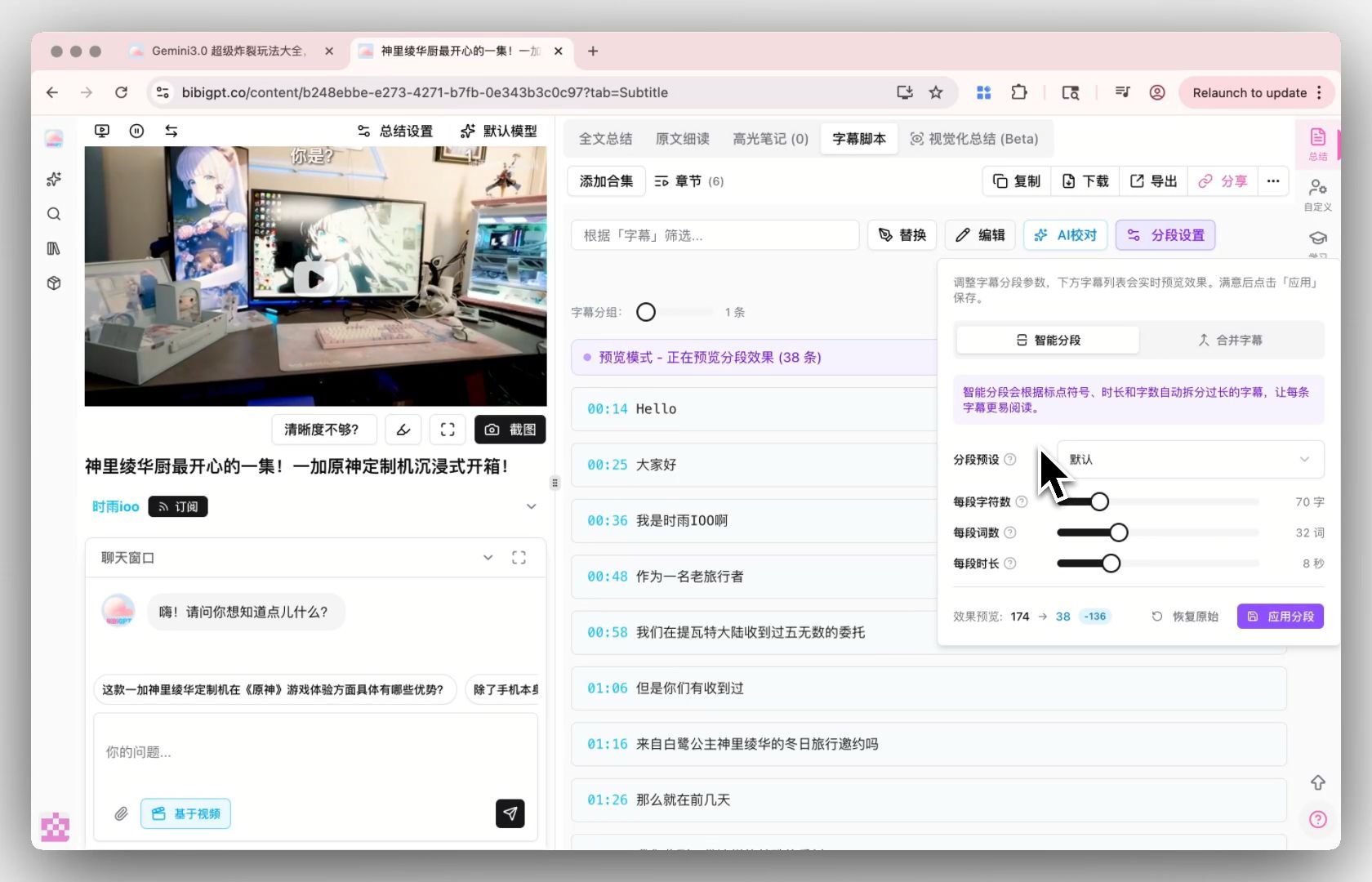
Screenshot: BibiGPT · Smart subtitle segmentation demo
Practical rule: Don’t lock yourself into one engine just to chase whichever model is newest—treat “being able to switch engines anytime” as your real core capability.
Fitting transcription into your workflow with BibiGPT
Instead of bouncing back and forth between two open-source models, BibiGPT’s approach is to hand the choice back to you. In the custom transcription engine, you can bring your own API Key (BYOK) and freely switch between multiple top-tier transcription engines—pick based on your material’s language, and whether you’re optimizing for speed or precision.
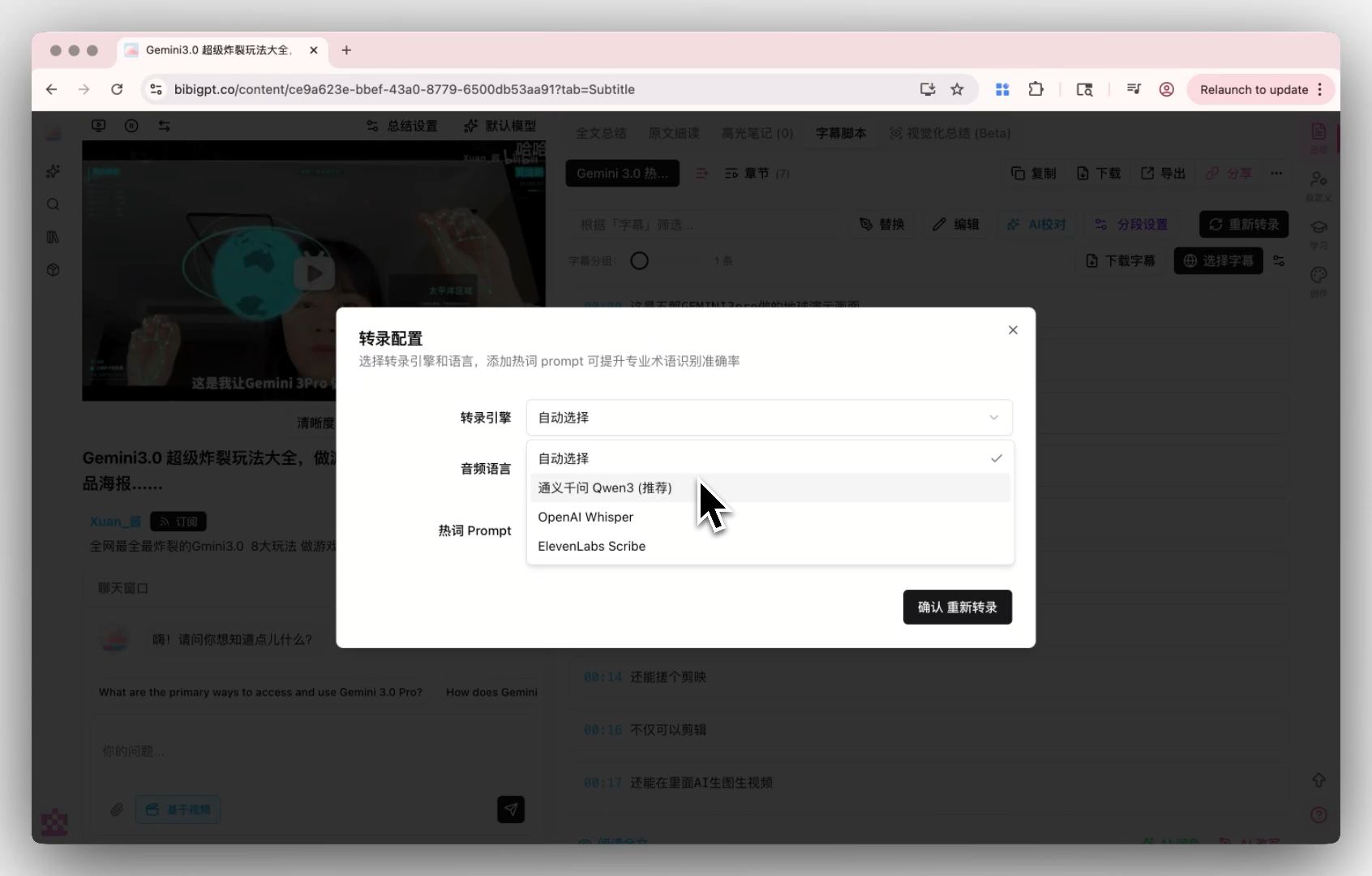
Screenshot: BibiGPT · Transcription provider switching demo
Once transcription finishes, you also need to be able to grab it in one click. The image below shows the entry point for exporting transcripts in different formats for different use cases:
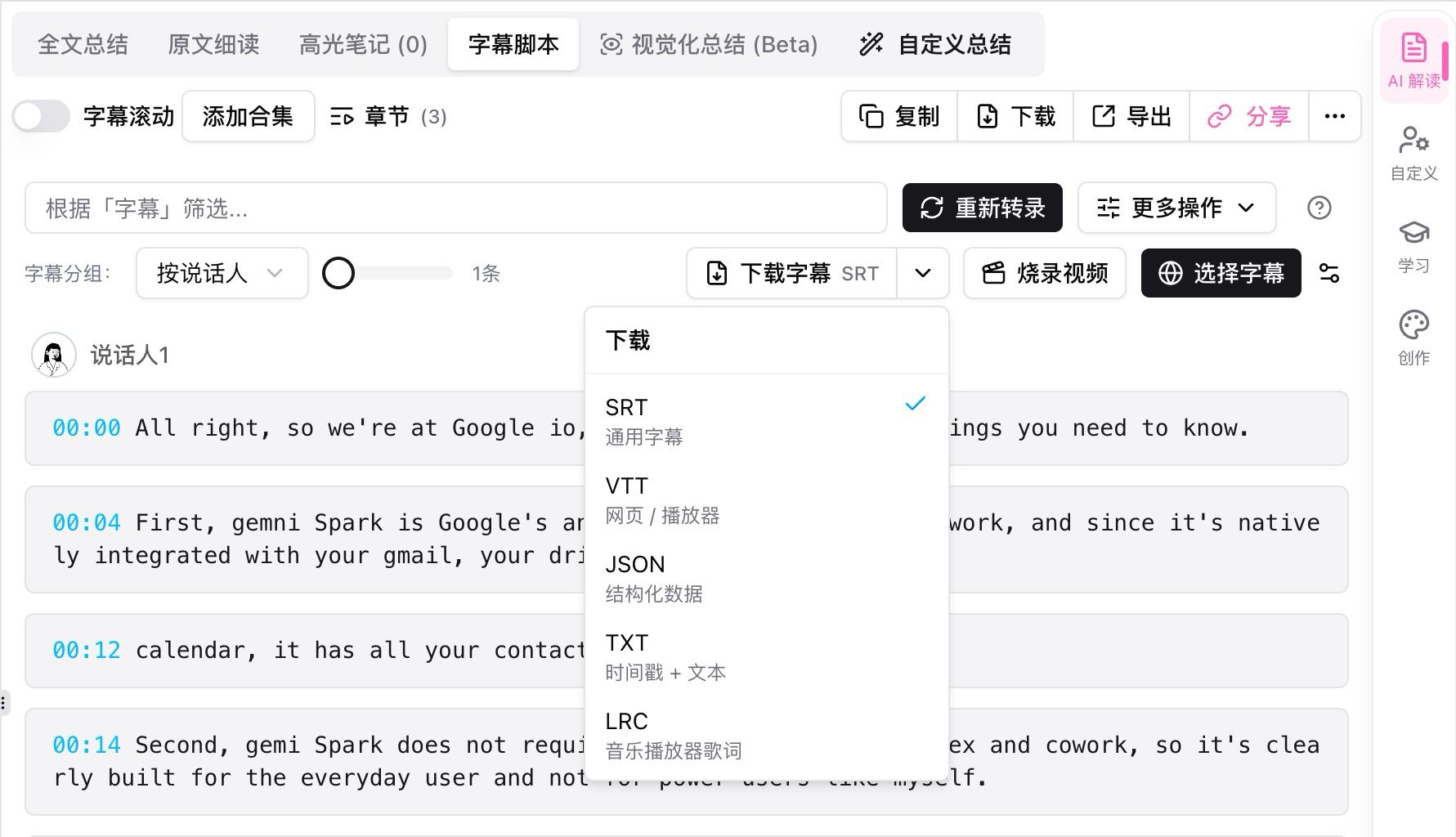
Screenshot: BibiGPT · Transcript multi-format download demo
More importantly, transcription is just the starting point. BibiGPT has already served over 1 million users, generated more than 5 million AI summaries, and supports 30+ mainstream audio and video platforms—paste in a link, and it automatically runs through the entire chain:
- Fetch the audio/video and convert it into a transcript
- Use AI to generate a structured summary and mind map
- Export SRT subtitles or multi-format transcripts, feeding into your speech-to-text workflow
- Turn a podcast into an article or YouTube into text in one click
A practical workflow: paste the link → pick your transcription engine → use the summary to locate the key sections → export the transcript or subtitles. Try it first with free video summarization to see the results for yourself.
Summarize any video in seconds
Pick a sample below to see the AI summary — TL;DR, key points, and jump-to timestamps.
TL;DR: Karpathy builds a GPT-style language model from scratch in code, explaining every piece — from a tiny character-level model up to the full Transformer.
Key points
- Start with a bigram model, then add self-attention so tokens can "talk" to each other
- A Transformer block = multi-head attention + feed-forward + residual connections + layer norm
- Training is just predicting the next token; scale and data do the rest
- The same architecture behind nanoGPT is what scales up to ChatGPT
Jump to
- 00:07 Why build GPT from scratch
- 08:23 Self-attention, intuitively
- 1:00:00 Assembling the Transformer block
- 1:35:00 From nanoGPT to ChatGPT
Practical rule: Instead of agonizing over which model is most accurate right this second, pick a tool that lets you bring your own key and switch engines anytime—keep the choice in your own hands.
The people who actually get compounding value out of audio and video content never obsess over “which model scores higher on the leaderboard”—they obsess over “what am I going to do with this transcript next.” If you want every step after transcription to flow smoothly, go try BibiGPT for free.
Frequently Asked Questions (FAQ)
Which is more accurate for transcription, Parakeet or Whisper? On English content, Parakeet has a lower WER (about 6.05% vs about 7.4%), making it both more accurate and faster; but once you’re dealing with non-English material like Chinese or Japanese, the original Parakeet can’t be used at all, and Whisper is the only viable option.
Does Parakeet support Chinese? The original Parakeet v2 only supports English, and its vocabulary doesn’t include Chinese. The later v3 release extended coverage to 25 European languages, but still doesn’t include Chinese, Japanese, or Korean. For Chinese, use Whisper or another multilingual transcription service.
Why is Parakeet so much faster than Whisper? Parakeet uses a more efficient FastConformer architecture with a smaller parameter count (600 million vs Whisper’s 1.55 billion), reaching an RTFx of around 3380 on GPUs—giving it far higher throughput than Whisper on long audio.
Can everyday users without a GPU still use these models? Yes. Using a packaged product like BibiGPT, you don’t need to set up an environment or touch the command line—just switch providers in the custom transcription engine, and you can even enter your own API Key to control cost and precision.
Does a lower WER always mean a better tool? Not necessarily. WER treats every word the same, so misrecognizing a filler word and misrecognizing a person’s name score identically—but the cost to the user is wildly different. When choosing a tool, pay more attention to how accurately it handles proper nouns, numbers, and terminology rather than just the average WER.
BibiGPT Team
Popular tools
More in this series
- Video to Text Complete Guide (2026 Updated): YouTube Subtitle Download, Cloud Drives, Bilibili Courses & Multi-Source Solutions
- Best Xiaohongshu Video to Text Tool in 2026: BibiGPT Helps You Create Viral Posts Easily!
- AI Subtitle Translation Workflow Guide 2026: Extract, Translate & Hardcode with BibiGPT
- AI सबटाइटल अनुवाद टूल्स 2026: 6 प्लेटफ़ॉर्म जो एक ही pass में अनुवाद + Burn-in करते हैं
- AI Video to SRT is Offline Only — BibiGPT Extracts Subtitles from 30+ Platforms with AI Summary