YouTube Video Summarizer API Key: A 2026 Developer Guide

YouTube does not give you a summarizer API key. Get one in BibiGPT: Settings → Open API, recharge API balance (minutes, separate from membership), then summarize a YouTube URL via Agent Skill or Open API.
That is the whole path. The phrase people type into search — “YouTube video summarizer API key” — names a job, not a Google product. YouTube ships a Data API and caption tracks. Summaries are a third-party layer you add on top, for a user who actually has API balance. Paste a link below and you will see the structured output that layer should return.
Summarize any video in seconds
Pick a sample below to see the AI summary — TL;DR, key points, and jump-to timestamps.
TL;DR: Karpathy builds a GPT-style language model from scratch in code, explaining every piece — from a tiny character-level model up to the full Transformer.
Key points
- Start with a bigram model, then add self-attention so tokens can "talk" to each other
- A Transformer block = multi-head attention + feed-forward + residual connections + layer norm
- Training is just predicting the next token; scale and data do the rest
- The same architecture behind nanoGPT is what scales up to ChatGPT
Jump to
- 00:07 Why build GPT from scratch
- 08:23 Self-attention, intuitively
- 1:00:00 Assembling the Transformer block
- 1:35:00 From nanoGPT to ChatGPT
Does YouTube give you a summarizer API key?
No. Google does not sell a “YouTube summarizer API key.” What it does sell access to is the YouTube Data API: video metadata, playlists, comments, and — with the right authorization — caption tracks. Those endpoints tell you what a video is. They do not tell you what a video means.
This mix-up is structural. Search engines treat “summarizer” as a feature word and “API key” as a developer word, so the query looks like one product. In the actual stack they are two products:
- YouTube owns the video, the player, and the official caption file when the creator uploaded one or when YouTube auto-generated one. See YouTube’s own captions help.
- A summarizer takes text (captions, a transcript, or speech-to-text from a file the user owns) and compresses it into takeaways, chapters, and quotes.
If you create a Google Cloud project, enable YouTube Data API v3, and mint an API key, you still cannot call summarize(videoId). That method does not exist. An API key for Data API is a credential for YouTube’s surface, not a license to run a summarizer, and not a license to scrape timed text from the watch page.
Prefer to watch the output you actually want? The clip below walks through paste-a-link summarization — the shape a third-party key should return, which Data API will never emit:
Source: YouTube · a walkthrough of turning a video into a structured summary.
Practical rule: Treat “YouTube summarizer API key” as a search query, not a Google SKU. The Data API will never return a summary. If a vendor implies otherwise, they are wrapping a third-party layer and calling it YouTube.
What developers actually need: captions vs summary vs chapters
Before you pick a key, pick an output. Most “summarizer API” tickets are really three tickets taped together, and they fail for different reasons.
Captions are timed text. They are the faithful layer: who said what, and when. If the video already has a caption track, extracting that track is faster and more accurate than re-transcribing the audio. A YouTube transcript generator is the right tool when you need a copy-paste block, an SRT, or a searchable transcript. A YouTube to text converter is the same job with a slightly different promise — continuous prose you can edit.
A summary is compressed meaning. It is not a shorter caption file. It groups arguments, drops filler, and writes in the language the reader asked for. That is what teams actually put in Slack, Notion, or a research inbox. BibiGPT’s AI YouTube summary is this layer: chapters, takeaways, and follow-up questions, not a dump of every subtitle line.
Chapters are a map. They let a human (or an agent) jump to a section instead of reading 8,000 words of transcript. If you store only a blob of text, you have search. If you store chapters, you have navigation.
The reason this split matters for API design is simple: subtitles are the API of audiovisual content. Video and audio are not programmable until they become text. A summarizer that skips the caption/transcript layer is guessing. A pipeline that stops at the caption layer is a downloader. The useful product is the sandwich: official or user-owned text in, structured summary out.
That is also why “just give me the key” is the wrong first ticket. A key without an output contract will get you a blob. Decide whether the caller needs timed captions, a one-page brief, or a chapter list — then choose the path in the next section.
Practical rule: If you cannot say whether the caller needs captions, a summary, or chapters, you are not ready for a key. Subtitles are the API of AV; the summary is a second service that reads that API.
Three legal-ish paths: official captions, user-upload, third-party summarizer API
There is no clean “always legal, always free, always works” button. There are three paths that stay on the right side of YouTube’s Terms of Service more often than a scraper does.
Path 1 — Official captions. If you are the video owner, use YouTube Studio or the Data API caption endpoints with OAuth as that owner. If you are a viewer, use the captions the creator actually published (the CC button), not a reverse-engineered timedtext URL. Scraping captions from the watch page, rotating residential proxies, or wrapping yt-dlp as “an API” can violate the ToS even when the captions are public. Public is not the same as “free to harvest in bulk.”
Path 2 — User-owned files. The user recorded the lecture, exported the webinar, or has a local MP4 they are allowed to process. They upload the file. Speech-to-text runs on their bytes. No YouTube HTML is fetched. This is the cleanest path for internal training videos, podcasts you host, and anything that never lived on YouTube.
Path 3 — A third-party summarizer API the user has billed. This is the BibiGPT path. The user pastes a YouTube URL. BibiGPT returns a structured summary for that user, and only if that user has API balance. You are not running a shadow YouTube; you are calling a product the user already has an account with. Setup lives in the BibiGPT docs and in Settings → Open API, not in a scraped caption dump.
Path 3 is the one that matches the search query. The user still has to have rights to process the video under YouTube’s rules and under their own policy. A summarizer key does not wash a ToS problem. It does mean you stop pretending Google issued the key.
When a teammate says “we will just pull captions in the background,” ask who owns the file. If the answer is “YouTube, and we don’t have OAuth as the owner,” you are on Path 1’s viewer branch or you are about to scrape. Pick Path 3 or ask the user to upload.
Practical rule: If you do not own the file and the captions are not officially available to you, do not scrape. Prefer official captions, a user-owned upload, or a billed third-party summarizer. A key is not a loophole.
How BibiGPT separates membership vs API balance
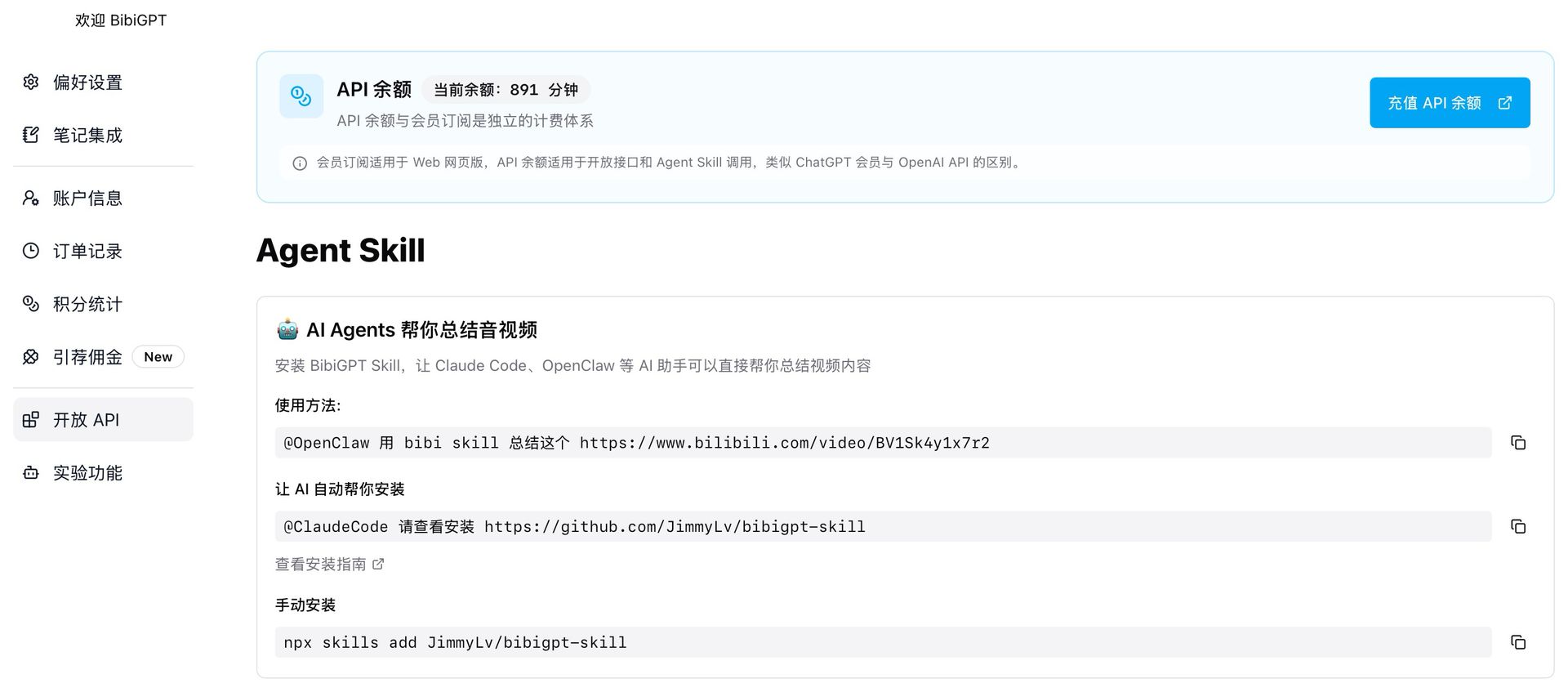
Developers get stuck here because the product has two wallets on purpose. Membership is what you use in the BibiGPT UI — paste a link, read the summary, chat with the video. API balance is what programmatic callers spend. They are both measured in minutes of source media, and they are not the same bucket.
The developer path is a product path, not a hidden JSON ritual:
- Sign in at BibiGPT.
- Open Settings → Open API.
- Read API balance in minutes. This number is independent of whether you are on a free or paid membership.
- Recharge API balance if it is empty. Do not expect membership minutes to pay for Agent Skill or Open API calls.
- Create a key in that screen, copy it once, and store it in your secret manager. Do not paste it into a repo, a screenshot, or a chat log.
- Call BibiGPT Skill from a coding agent, or call Open API from your backend, with a YouTube URL. The user who holds the key is the user who is billed.
The settings screenshot below is the entry you are looking for — Open API on one side, membership on the other, API balance in minutes in the middle:
Screenshot: BibiGPT · Settings → Open API · membership and API balance as two wallets.
Why split them? Because a 20-seat team can share a membership for reading, while a nightly job that summarizes 400 URLs should not silently drain the humans’ quota. If a call comes back unpaid, the fix is “recharge API balance,” not “upgrade the plan and hope.” The docs walk the same screens; this article will not invent request bodies or example keys.
You will not find yen prices, hidden SKUs, or a model picker in this guide. You pick the product surface (UI vs Skill vs Open API). Minutes debit when a job runs. That is the contract.
Agent Skill vs raw HTTP: pick based on whether a coding agent or your backend calls it
An Agent Skill is a folder with a SKILL.md that teaches a coding agent a procedure: when to use it, what to collect, what to say if a call comes back unpaid. That contract is documented at agentskills.io and in Anthropic’s skills repo. It is not a new HTTP dialect. It is a way to ship instructions next to the agent so the agent stops guessing.
Use BibiGPT Skill when the caller is a coding agent — Claude Code, a harness, an IDE agent. The human says “summarize this YouTube URL.” The agent reads the skill, uses the user’s API balance, and returns chapters and takeaways. You do not write a client. You install the skill and let the agent follow it.
The skill directory below is the public listing for that install — look for BibiGPT Skill, not a made-up path:
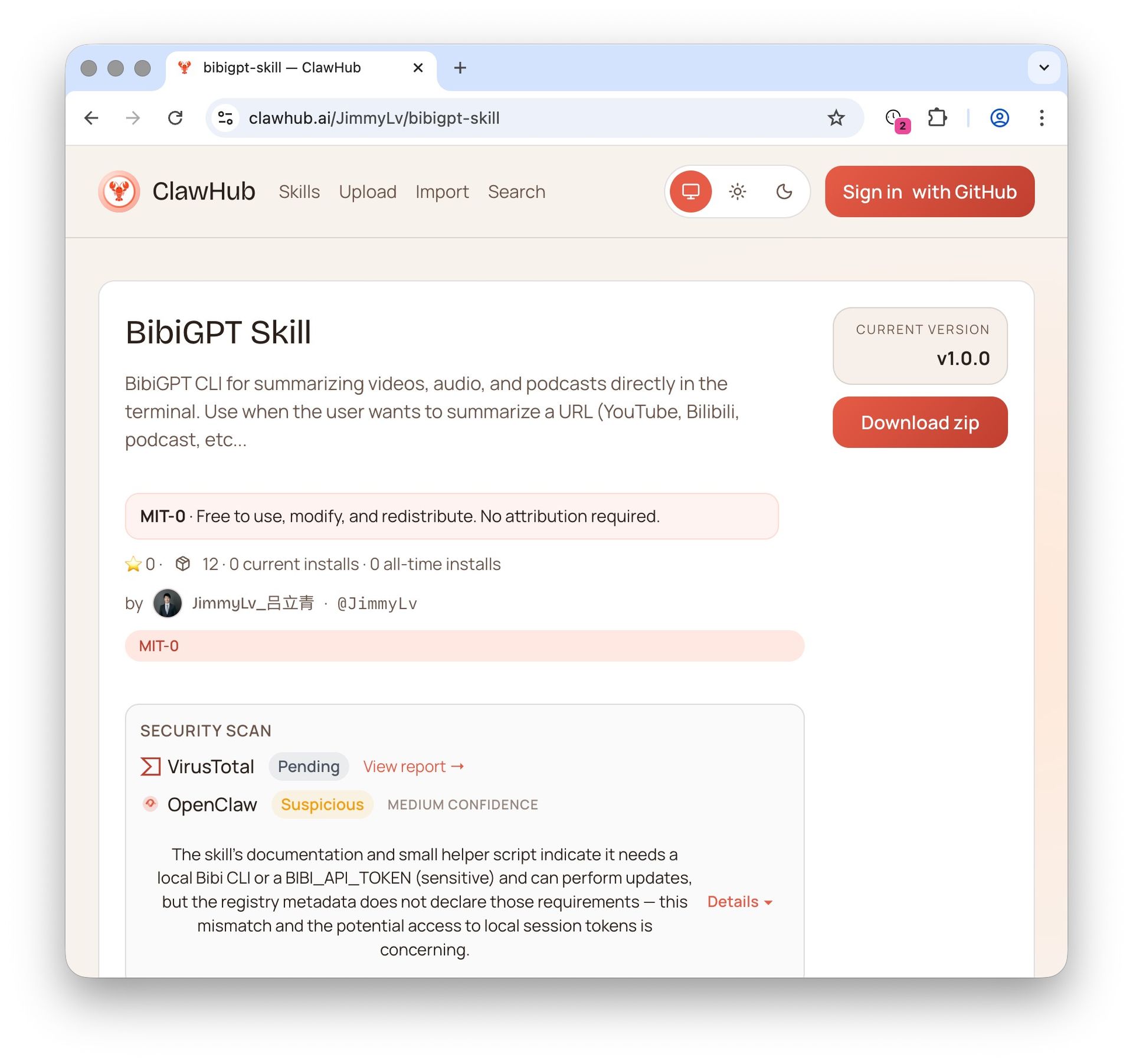
Screenshot: BibiGPT Skill in a public agent-skill directory. Install the skill; do not invent a URL.
Use raw HTTP (Open API) when the caller is your backend: a queue, a cron, a Next.js route, an internal admin tool. The agent is not in the loop. Your server holds the key, accepts a YouTube URL from a signed-in user, and renders the structured summary in your UI. Setup is still Settings → Open API. Details stay in the docs.
The CLI help below is what a skill drives under the hood — same account, same API balance, usable from a shell when you are debugging:
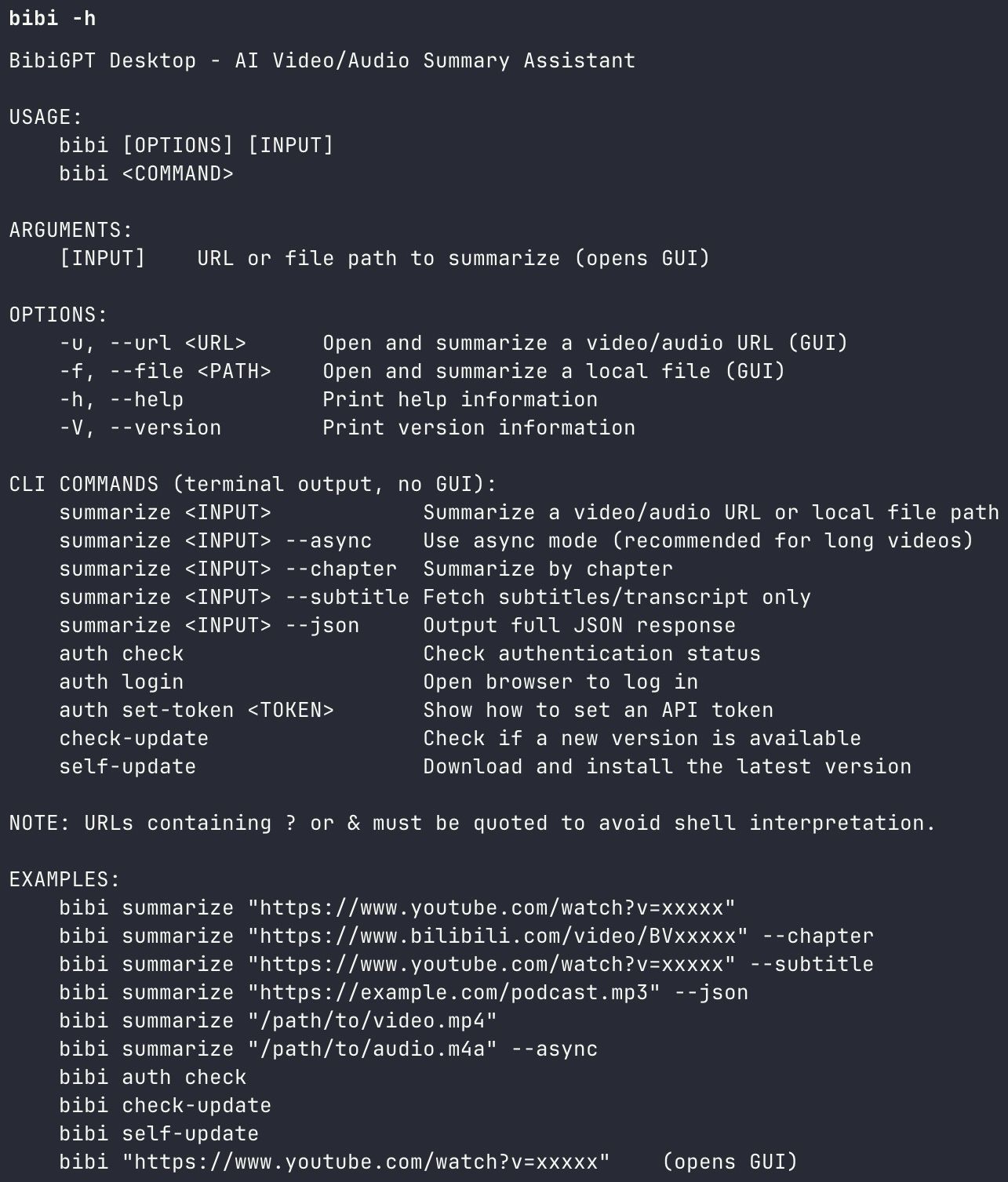
Screenshot: BibiGPT · the CLI help a skill uses. Same balance, no extra key type.
Do not wrap Open API in a fake skill “so the agent has something to call” if BibiGPT Skill already exists. Do not shell out to curl from an agent that can load a skill. Pick the surface that matches the caller.
Practical rule: If a coding agent is the caller, install BibiGPT Skill. If your backend is the caller, use Open API. One key, two surfaces — choose by who types the URL, not by which one sounds more “AI.”
Production checklist: quotas, retries, no secrets in git
Shipping the key is the easy part. The failures that page on-call are quota, silence, and leaked secrets.
Quotas. Watch API balance in minutes, not “number of videos.” A three-hour keynote costs more than a 12-minute product clip. Membership minutes will not save a batch job. Credits Stats now has an API tab that lists calls made with an API token or an Agent Skill for the current month — use it to confirm the script is doing what you think.
The dashboard below is that tab: per-endpoint usage so a runaway loop shows up before the tank is empty.
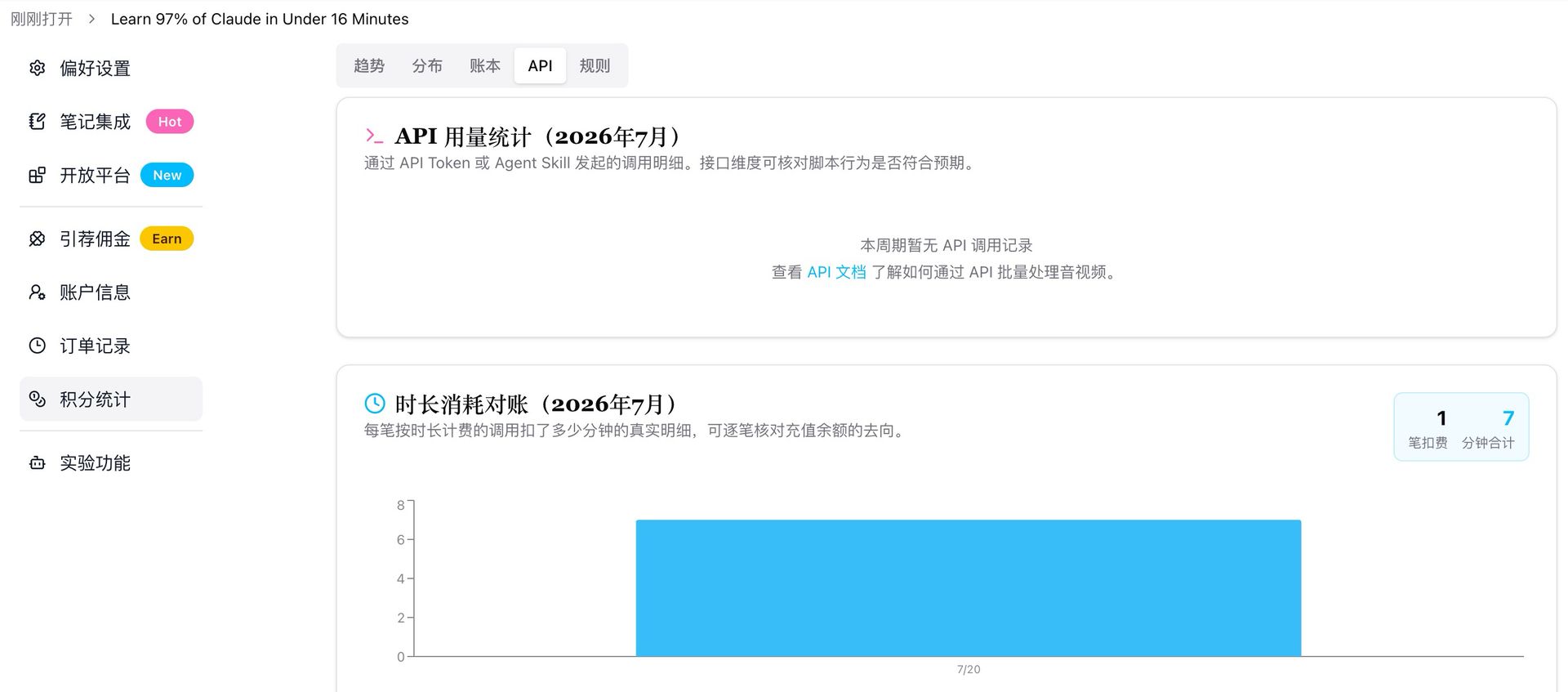
Screenshot: BibiGPT · Credits Stats · API usage. Check this before you scale a cron.
If it fails, show the reason. Do not retry in a tight loop and return “something went wrong.” If the balance is empty, say the balance is empty and point the user at Settings → Open API. If the URL is private, say it is private. If YouTube has no captions and the user did not upload a file, say you need one of those two. User-language errors cost one support ticket; swallowed errors cost a night of minutes.
No secrets in git. The Open API key is a secret. Put it in the platform secret store, in a .env that is gitignored, or in the agent’s local config. Rotate it if it ever hit a gist, a CI log, or a screenshot in Slack. This article will not print a sample key.
Retries. Retry on timeouts and transient network errors, with backoff. Do not retry on “unpaid,” “forbidden,” or “this video cannot be processed.” Those are not transients. Logging the reason next to the URL is enough to debug without a packet capture.
ToS and inputs. Prefer official captions or a user-owned file. Do not scrape. Do not cache other people’s full transcripts as a public dataset. BibiGPT accepts a YouTube URL and returns a structured summary for the user who has API balance — that user is still responsible for what they submit.
When this checklist is green, you do not need a second key “for production.” You need a secret manager, a visible error, and a recharge button.
FAQ
Does YouTube offer an official summarizer API key?
No. YouTube offers the Data API and caption tracks. Summarization is a third-party layer. A Google Cloud API key is not a summarizer key.
How do I get a YouTube video summarizer API key in practice?
Sign in to BibiGPT, open Settings → Open API, recharge API balance in minutes (separate from membership), and use BibiGPT Skill or Open API with a YouTube URL. See the docs for the screens.
Is scraping YouTube captions allowed?
Often no. YouTube’s Terms of Service restrict automated access that the Data API does not cover. Prefer official captions you are authorized to download, a file the user owns, or a billed product the user asked to run.
What is the difference between membership and API balance?
Membership minutes power the BibiGPT UI. API balance minutes power Open API and Agent Skill calls. They look similar (both are minutes) and they are billed separately. Recharging one does not fill the other.
Should I use Agent Skill or raw HTTP?
If a coding agent is typing the YouTube URL, install BibiGPT Skill (the Agent Skills format at agentskills.io). If your backend is typing it, call Open API. Same account, same API balance.
Can I summarize a video I do not own?
Only under YouTube’s rules and your own policy. A summarizer key does not grant extra rights. When in doubt, ask the user to upload a file they own, or stick to caption tracks they are allowed to use.
Want the key without the folklore? Open BibiGPT, go to Settings → Open API, recharge API balance, and let BibiGPT Skill or Open API return the structured summary.
—— BibiGPT Team
Popular tools
More in this series
- Best Free YouTube Transcript Extractor 2026: 7 Tools Compared
- YouTube Subtitle Extractor: Best Downloaders Compared (2026)
- Free YouTube Transcript Generator: Top 5 AI Tools Ranked (2026)
- How to Get a YouTube Transcript for Claude (and Any AI Agent)
- Best Video Summarizer & YouTube Transcript MCP Servers for AI Agents (2026)