Best YouSubtitles Alternatives 2026: 6 AI Video Subtitle Tools Compared

Table of Contents
- What is the best YouSubtitles alternative?
- How to choose: it is not just “download subtitles”
- Which 6 YouSubtitles alternatives are worth using?
- Decision table: which tool for which use case?
- Why BibiGPT stands out
- FAQ
- Wrap-up
What is the best YouSubtitles alternative?
Quick answer: If you only need to grab ready-made CC subtitles from YouTube, free utilities like DownSub or SaveSubs are enough. If you also process Bilibili, TikTok, podcasts, lectures, or local recordings — and want AI summaries, translation, and SRT export in the same flow — BibiGPT is the most complete YouSubtitles alternative in 2026. It covers 30+ platforms and turns any URL into time-stamped subtitles, structured summaries, and bilingual translations in a single click.
YouSubtitles was a pioneer of YouTube caption downloaders, focused on one scenario: scraping existing CC tracks. But content consumption has already moved beyond YouTube into Bilibili, Spotify podcasts, TikTok shorts, and local lecture recordings. Users now want:
- Multi-platform coverage beyond YouTube
- Transcription for videos without captions (lectures, livestreams, interviews)
- Post-processing — summaries, translation, export-ready notes
- Accuracy guarantees, including hard subtitles burned into the frame
These needs produced a whole generation of YouSubtitles alternatives. This article compares six of the most common ones based on real use.
How to choose: it is not just “download subtitles”
Quick answer: A serious YouSubtitles alternative should be evaluated on at least five axes — platform coverage, support for videos without captions, translation, export formats, and downstream AI features beyond a raw SRT.
| Dimension | Description | Why it matters |
|---|---|---|
| Platform coverage | How many video/audio sources | You watch more than YouTube |
| No-caption fallback | AI transcription for videos without CC | Required for lectures, livestreams |
| Accuracy | ASR + hard-subtitle OCR precision | Drives translation & note quality |
| Translation | Multilingual, line-by-line with timestamps | Needed for localization, study |
| Export formats | SRT / VTT / TXT / Markdown | Determines pipeline compatibility |
| AI summary & notes | Structured output beyond plain text | Saves copying text into ChatGPT |
A pure subtitle downloader only solves dimensions 1-2. An AI video assistant like BibiGPT covers all six.
Which 6 YouSubtitles alternatives are worth using?
Quick answer: The six alternatives worth your time are BibiGPT (best overall, AI summary on top of subtitles), DownSub and SaveSubs (free quick CC download), Downsub.com, Subtitle Edit (professional editing), and Notta (meeting-oriented transcription). Each is reviewed below on coverage, accuracy, and export options.
1. BibiGPT — Best overall alternative
Positioning: An AI audio/video assistant where subtitle extraction is one of many capabilities.
- ✅ Platform coverage: 30+ — YouTube, Bilibili, TikTok/Douyin, Xiaohongshu, Spotify, podcast apps, local files, cloud-drive auto-sync
- ✅ No-caption videos — built-in ASR with switchable ElevenLabs Scribe engine for premium accuracy
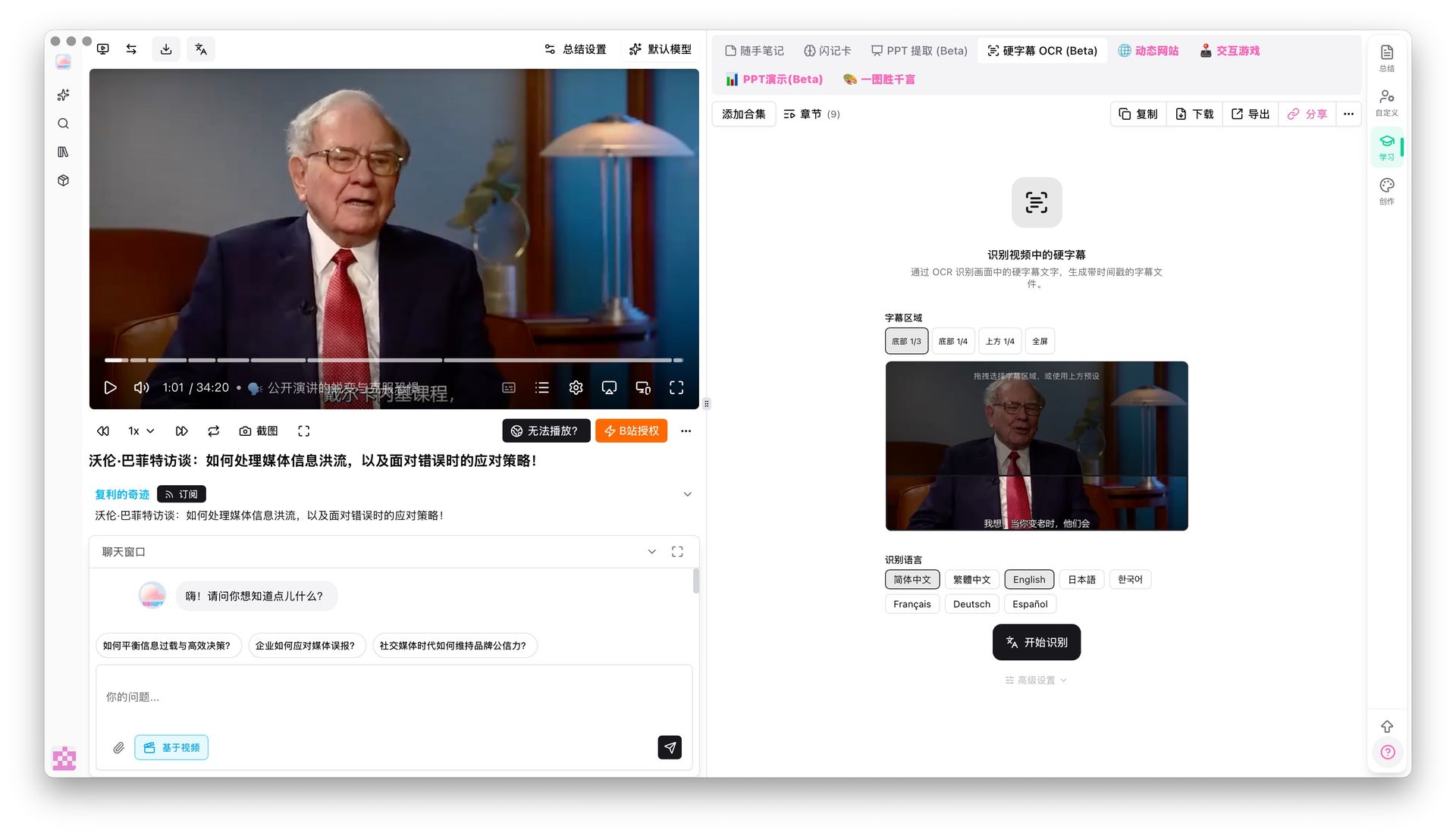
- ✅ Hard-subtitle OCR (Beta) — reads burned-in captions directly from the frame in 6 languages
- ✅ Translation — line-by-line with preserved timestamps, bilingual SRT output
- ✅ Export — SRT / VTT / TXT / Markdown / PDF, optional raw-subtitle inclusion in notes
- ✅ AI summary — structured chapters, timestamps, mind maps from the same URL
- ⚠️ Some premium features (hard-subtitle OCR, video-to-article) require a Pro plan
You can try the core extractor directly — see the Bilibili subtitle downloader, YouTube subtitle downloader, and video subtitle translation feature pages — just paste a link.
2. DownSub
Positioning: A pure subtitle downloader, closest in spirit to YouSubtitles.
- ✅ Free, no sign-up
- ✅ Supports YouTube, Facebook, Viki existing CC subtitles
- ✅ One-click switch between multiple language tracks
- ❌ Cannot handle videos without CC
- ❌ No support for Bilibili, Douyin, or podcast platforms
- ❌ No AI summary, no translation, no notes
- ❌ Ad-heavy, occasional subtitle encoding issues
Use it when: You only deal with YouTube CC and do not need post-processing.
3. YouSubtitles (original)
Positioning: A legacy YouTube caption downloader launched in 2014.
- ✅ Free
- ✅ Auto-generated and manual captions
- ❌ YouTube only, feature set has been frozen for years
- ❌ No translation, AI summary, or hard-subtitle OCR
- ❌ Minimal export options
Use it when: You need quick YouTube captions and do not mind a dated UI.
4. SaveSubs
Positioning: Multi-platform subtitle aggregator.
- ✅ YouTube, Vimeo, Facebook, Dailymotion
- ✅ SRT / VTT / TXT formats
- ✅ Language selector
- ❌ No ASR fallback for videos without CC
- ❌ Limited coverage for Chinese platforms
- ❌ Hits rate limits under heavy use
Use it when: You batch-download English captions across a few western platforms.
5. Subtitle Edit
Positioning: Open-source desktop subtitle editor.
- ✅ Free and open-source (Windows-first)
- ✅ Powerful editing — timing offsets, format conversion, batch replace
- ✅ Integrates Google Translate for machine translation
- ❌ Local install with a learning curve
- ❌ Does not download subtitles itself — you need another tool upstream
- ❌ Weak semantic AI
Use it when: You are a professional subtitle editor who needs deep manual control.
6. NoteGPT
Positioning: AI video summarizer that also exports captions.
- ✅ YouTube, Bilibili, TikTok support
- ✅ Subtitle export plus AI-generated notes
- ✅ Built-in translation
- ⚠️ Summaries run short, structural depth is limited
- ⚠️ No hard-subtitle OCR or serious local-file pipeline
Use it when: You want a lightweight summarizer and do not need advanced extraction.
For a wider landscape of AI video summary tools, read our 2026 best AI audio/video summary tool evaluation.
Decision table: which tool for which use case?
Quick answer: YouTube-only CC → DownSub/SaveSubs. Multi-platform + AI summary → BibiGPT. Professional subtitle editing → Subtitle Edit.
| Scenario | Pick | Why |
|---|---|---|
| YouTube CC only | DownSub / SaveSubs | Free, fast, zero setup |
| Bilibili / Douyin / Xiaohongshu | BibiGPT | Best coverage of Chinese platforms |
| Videos without captions (lectures, livestreams) | BibiGPT | Built-in premium ASR |
| Hard subtitles burned in frame | BibiGPT (OCR) | Exclusive feature |
| Batch transcription of local files | BibiGPT | Drag-and-drop + folder watch |
| Cross-language subtitle translation | BibiGPT | Line-by-line with preserved timestamps |
| Deep editing of existing SRTs | Subtitle Edit | Professional editor |
| Subtitles + AI structured notes | BibiGPT | One-stop pipeline |
| YouTube English summary | NoteGPT | Works for light needs |
Why BibiGPT stands out
Quick answer: YouSubtitles treats subtitle download as the goal. BibiGPT treats it as the starting point — once you have the captions, translation, summarization, notes export, and even a video-to-article conversion happen in the same interface, saving five copy-paste round-trips.
BibiGPT is trusted by over 1 million users and has generated over 5 million AI summaries. Four exclusive capabilities differentiate it from classic YouSubtitles alternatives:
1. Hard-subtitle OCR
Many interviews and online courses burn captions straight onto the video. Traditional tools must rely on ASR, which fails with strong accents or noise. BibiGPT reads the on-screen text directly (Chinese, English, Japanese, French, German, Spanish).
2. Smart subtitle segmentation
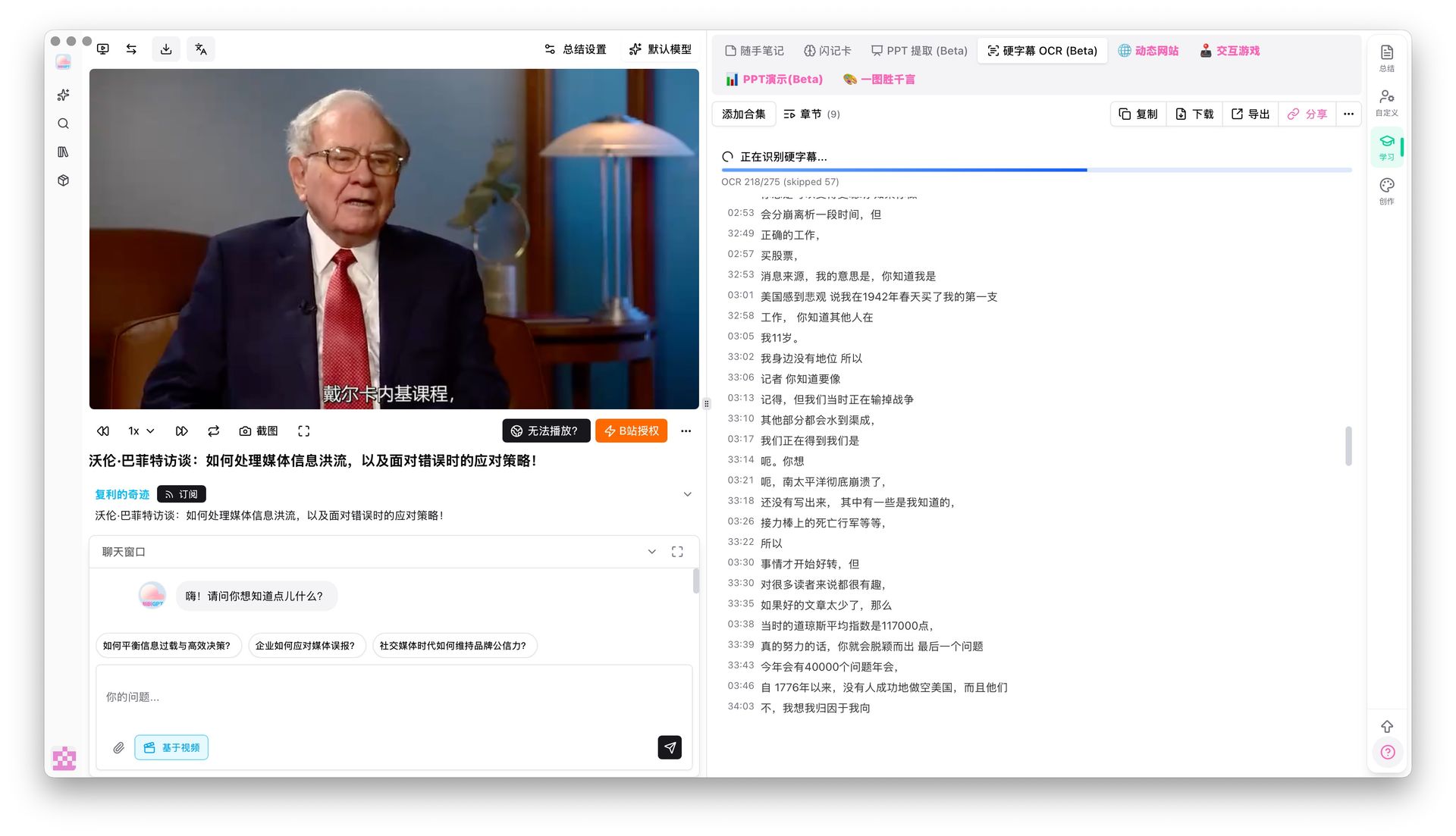
Raw captions tend to be over-fragmented. BibiGPT merges 174 short lines into 38 readable sentences with live preview, using presets like “short / long / CJK-optimized”. This matters for downstream translation — coherent sentences translate much better than chopped fragments.
3. Line-by-line translation with preserved timestamps
The most common mistake is dumping the whole transcript into a translator and losing time codes. BibiGPT translates line by line, keeps every timestamp, and outputs a bilingual SRT. Pair it with the FFmpeg commands in our AI subtitle translation + bilingual burn-in workflow for a full pipeline.
4. From subtitles to structured notes and articles
YouSubtitles ends at a file; BibiGPT continues into chapter-structured summaries, mind maps, and even AI-written image-rich articles — see AI video to article.
FAQ
Q1: What is the key difference between YouSubtitles and BibiGPT? A: YouSubtitles is a single-purpose YouTube caption downloader. BibiGPT supports 30+ platforms, handles videos without CC via ASR, reads hard subtitles with OCR, translates line by line, and produces structured AI summaries.
Q2: How accurate is BibiGPT subtitle extraction? A: When a platform provides CC, BibiGPT reuses the original track so accuracy matches the source. For ASR-based videos, users can switch to high-precision transcription for premium accuracy.
Q3: Which YouSubtitles alternatives are fully free? A: DownSub, SaveSubs, Subtitle Edit, and the original YouSubtitles are free. BibiGPT offers a free tier; advanced capabilities such as hard-subtitle OCR and video-to-article require a Pro plan.
Q4: Can I extract YouTube subtitles without signing up? A: DownSub and SaveSubs need no account. BibiGPT allows guest trials for basic extraction but requires sign-up for translation, summaries, and note sync.
Q5: What is hard-subtitle OCR? A: Hard subtitles are burned into the video frame. Regular downloaders cannot fetch them. BibiGPT uses OCR to read them directly from the image, ideal for interviews and courses without a separate subtitle track.
Wrap-up
YouSubtitles did its job — it proved YouTube captions should be downloadable in one click. But content today lives far beyond YouTube: Bilibili, podcasts, local recordings, and hard-subtitled interviews all need a unified solution.
If you only need an occasional YouTube CC grab, DownSub stays handy. But if your workflow touches multiple platforms, missing-caption videos, translation burn-in, or any AI post-processing, BibiGPT is the most complete YouSubtitles alternative right now.
Try it:
- 🎬 Visit aitodo.co — paste any link to get subtitles plus AI summary
- 📥 Download the BibiGPT desktop client for batch local processing
- 💡 Use video subtitle translation for cross-language localization
BibiGPT Team
Popular tools
More in this series
- Video to Text Complete Guide (2026 Updated): YouTube Subtitle Download, Cloud Drives, Bilibili Courses & Multi-Source Solutions
- Best Xiaohongshu Video to Text Tool in 2026: BibiGPT Helps You Create Viral Posts Easily!
- AI Subtitle Translation Workflow Guide 2026: Extract, Translate & Hardcode with BibiGPT
- AI Subtitle Translation Tools 2026: 6 Platforms That Translate + Burn-in in One Pass
- AI Video to SRT is Offline Only — BibiGPT Extracts Subtitles from 30+ Platforms with AI Summary