Free AI Video Summary Tools: Summarize YouTube, Bilibili & Local Videos With Timestamps (2026 Roundup)

Short answer: When you want to summarize videos with free AI, what matters comes down to four things — supports the platforms you watch (YouTube, Bilibili, local files), instant structured key points, timestamps (jump back to the original when unclear), and exports. This roundup covers the handiest free AI video summary tools of 2026 and gives you criteria for picking one. Among them, BibiGPT covers all four in one place — paste a link, get key points in tens of seconds. To try it first, paste a YouTube or Bilibili link into BibiGPT.
This free-tools roundup is part of the complete AI video summarizer guide — see it for what a video summarizer is and how to choose one once you’re ready to go beyond the free tier.
The demo below shows “paste a video link → instant structured key points”:
Summarize any video in seconds
Pick a sample below to see the AI summary — TL;DR, key points, and jump-to timestamps.
TL;DR: Karpathy builds a GPT-style language model from scratch in code, explaining every piece — from a tiny character-level model up to the full Transformer.
Key points
- Start with a bigram model, then add self-attention so tokens can "talk" to each other
- A Transformer block = multi-head attention + feed-forward + residual connections + layer norm
- Training is just predicting the next token; scale and data do the rest
- The same architecture behind nanoGPT is what scales up to ChatGPT
Jump to
- 00:07 Why build GPT from scratch
- 08:23 Self-attention, intuitively
- 1:00:00 Assembling the Transformer block
- 1:35:00 From nanoGPT to ChatGPT
Demo: BibiGPT one-click video summary
1. What Should You Look for in a Free AI Video Summary Tool?
Check five things before committing: platform coverage, a real free quota, timestamped output, export options, and follow-up Q&A. Most free tools fail on at least two of these, which is why a quick filter up front saves you from re-doing your notes later. Here are the five criteria in detail:
- Platform coverage — can it handle YouTube and Bilibili directly, and upload local files? Many tools only do YouTube, leaving Bilibili and local a blank.
- Speed — does it return key points in tens of seconds after pasting, or make you queue and wait?
- Timestamps or not — does the summary carry timestamp anchors? If so, anything unclear jumps back to that exact second of the original — the watershed between “usable” and “just pretty.”
- Can it export — can key points export to text, Markdown, or sync to Notion / Obsidian? A summary you can only view on a web page is disposable.
- Is the free quota enough for daily use — “free” depends on how many videos you can summarize per day; a stingy quota won’t cut it.
Practical rule: Don’t be dazzled by the word “free.” First check whether it supports the platforms you watch, outputs timestamps, and can export — these three decide whether it really fits into your routine.
2. 2026 Free AI Video Summary Tools Compared
Using the criteria above, here’s a comparison of mainstream approaches (info from each tool’s public materials):
| Tool type | Platform coverage | Timestamps | Export | Best for |
|---|---|---|---|---|
| BibiGPT | YouTube / Bilibili / local / podcasts, 30+ platforms | ✅ with jump | ✅ text/Markdown/Notion/Obsidian | Those wanting one place for many platforms |
| Browser extensions | Mostly YouTube only | Some | Mostly copy | YouTube-only watchers |
| General AI chat tools | Need to feed subtitles manually | ❌ | Copy | Occasional, willing to do manual steps |
| Built-in platform summaries | That platform only | Some | ❌ | Light use on a single platform |
Most free tools stall on “single platform” or “no timestamps / no export.” If you watch both YouTube and Bilibili and also upload local recordings, a one-stop video summary saves the hassle of switching tools.
The video below demos what one-click summarizing of a long video actually looks like, so you can gauge the speed:
Video source: YouTube · AI video summary demo
3. Why Do Free Tools Miss Timestamps and Export Most?
Because both features cost real engineering and storage money, free tiers usually strip them first: summaries arrive as plain text you cannot jump back from, and notes stay locked inside the tool. Those two gaps are exactly where most free-tool frustration comes from — here is how they bite in practice:
- No timestamps, and the summary stays “roughly” — for a two-hour class, the AI says “part three covers experiment design,” but you don’t know which minute, so confirming details means scrubbing the bar yourself. A timestamped summary jumps to that second with one click.
- No export, and the summary is “use once, gone” — you finally get a summary, can only view it on that page, and it’s gone when you close the tab — it never accumulates into your own library. Exporting to Notion / Obsidian turns scattered summaries into a searchable long-term knowledge base.

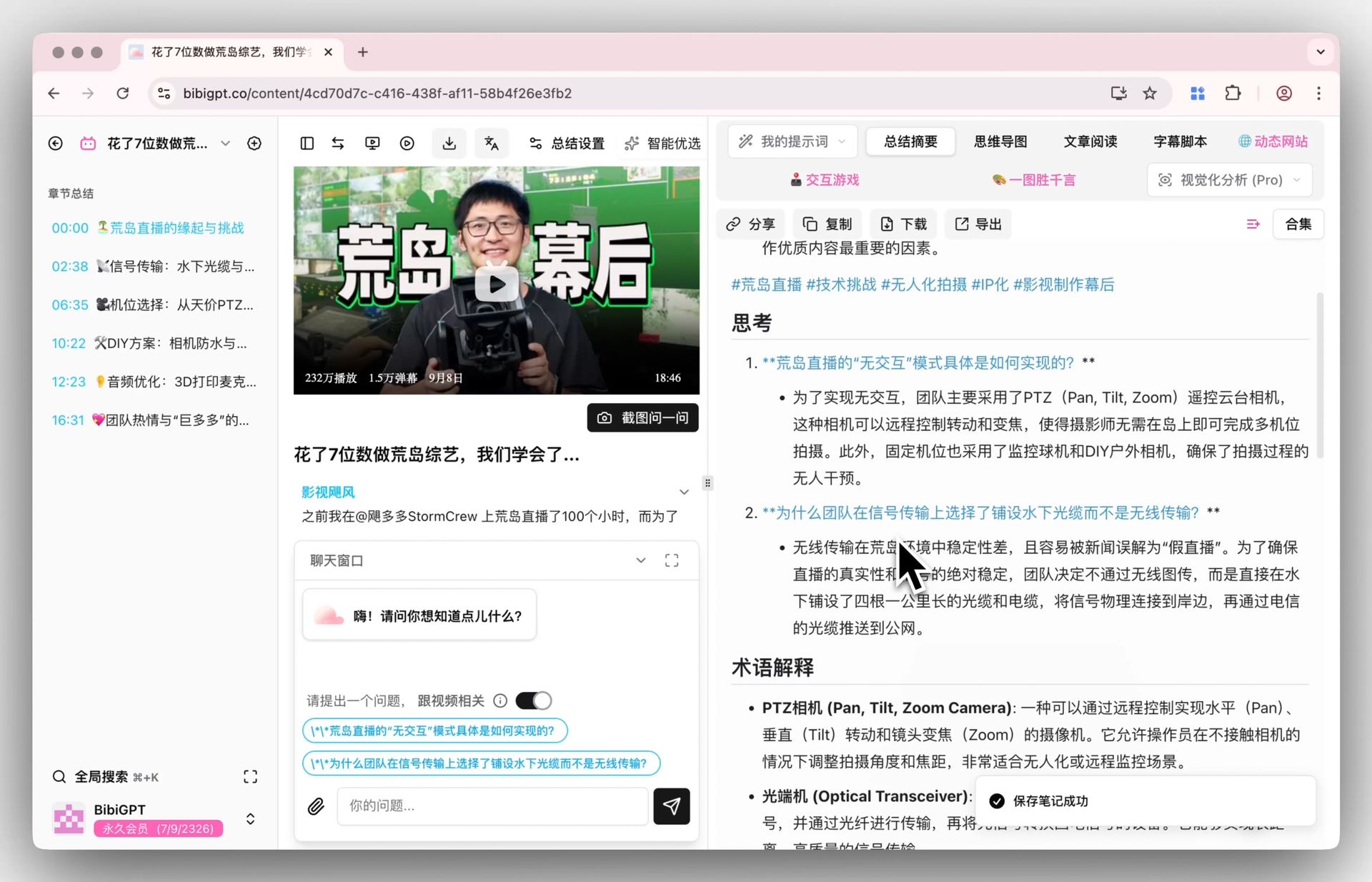
Screenshot: BibiGPT · chapter deep reading feature demo
For structurally complex content, generate a mind map to spread the whole video’s structure at a glance:
Turn a video into a mind map
A linear talk becomes a structured tree. Drag to pan, click nodes to fold.
Demo: BibiGPT auto-converts a long video into a structured outline
4. How Should You Use Free AI Video Summary Tools in Each Scenario?
Match the tool to the job: use timestamped summaries for study review, batch link processing for research triage, and export-friendly output for building a personal knowledge base. A free tool that fits one scenario perfectly beats a paid one used at random. The concrete playbooks:
- Students / online courses: paste study videos or course recordings for chapter key points, revise with timestamps, jump back to the original when unclear.
- Work / industry: long meeting recordings or conferences — get a TL;DR + key decisions, grasping two hours in a few minutes.
- Creators: after summarizing a long video/podcast, rewrite into an article or export a script, skipping the replay-to-find-clips loop.
- Shows / interests: for long interviews and documentaries, read the summary first to decide whether the full two hours is worth it.
One-click export and batch packaging turn scattered video key points into your own library. The product screenshot below shows the batch-export entry:
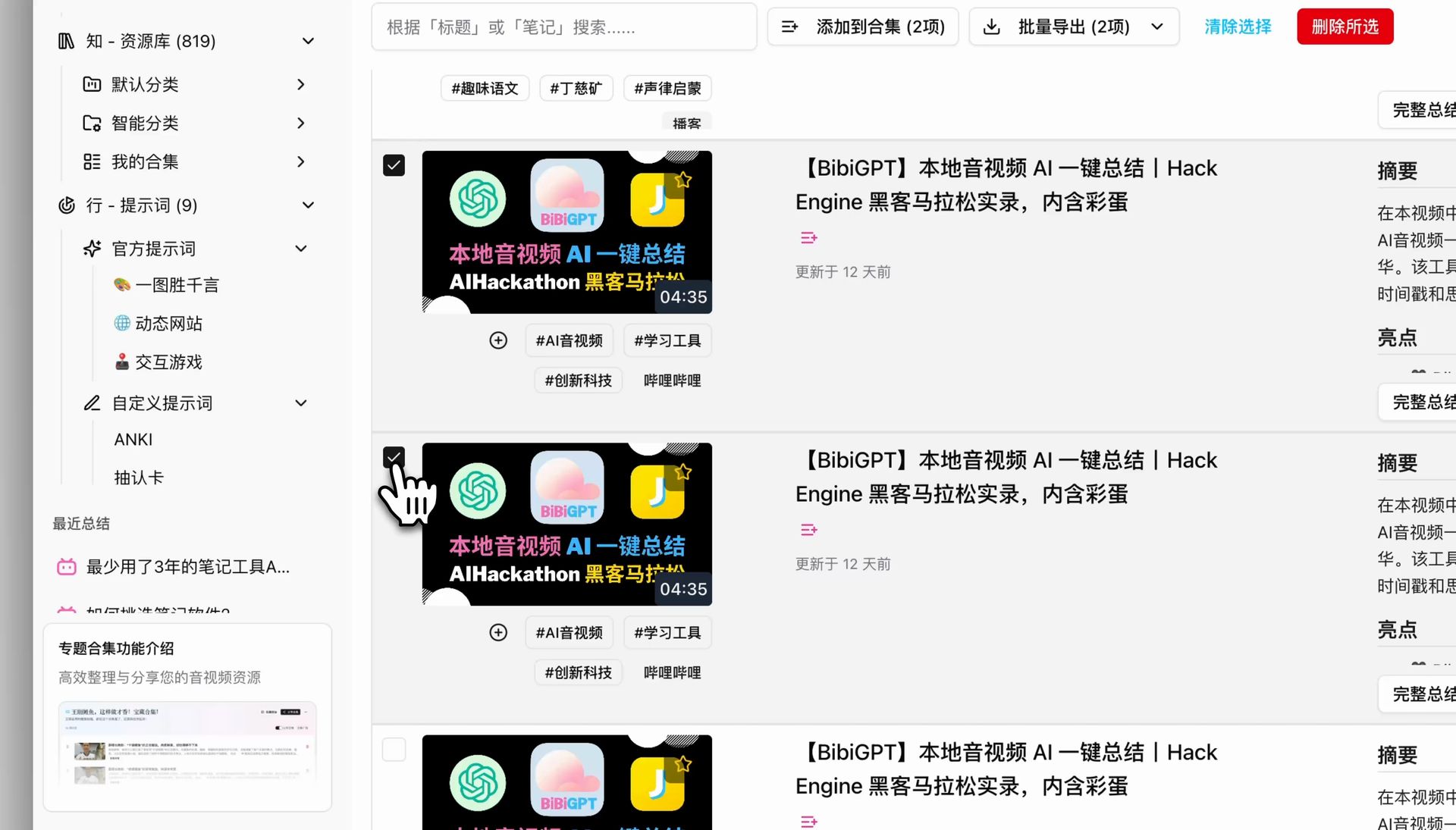
Screenshot: BibiGPT · batch export feature demo
Whatever the scenario, the core moves are the same: paste a link → get key points → jump/export as needed. Make it a habit to “summarize before watching a long video,” and you’ll free up a big chunk of time.
5. FAQ
Q1: Can free AI video summary tools summarize Bilibili videos directly? Depends on the tool. Many only support YouTube. BibiGPT supports Bilibili, YouTube, local files, and 30+ platforms — just paste a link.
Q2: Can local videos / recordings be summarized? Yes. Besides online links, local files can be uploaded and summarized — great for course recordings and meeting videos.
Q3: Do summaries come with timestamps, and can I jump back to unclear spots? Yes. Each key point carries an original timestamp; one click jumps back to that second to confirm details.
Q4: Can summaries be exported? Yes. Export to text and Markdown, and one-click sync to Notion / Obsidian to build your library.
Q5: How far does free go? New users can try the core features for free; heavy daily use can upgrade as needed. Run the flow for free first, then decide whether to go further.
Stop Watching Long Videos One by One — Try It Free First
A roundup is for using. Pick a long YouTube or Bilibili video you’ve wanted to watch but never had time for, paste it into BibiGPT, and get timestamped structured key points in tens of seconds — jumpable and exportable. One place covering YouTube, Bilibili, and local, no tool-switching. Free to try for new users.
Further reading: Million-token multimodal models and ultra-long video summaries · Cross-platform AI video summary guide
BibiGPT Team
Popular tools
More in this series
- AI Competitive Intelligence Workflow: Build Industry Monitoring with BibiGPT Video Summaries
- Lessons From Shipping BiliGPT: Two Cold-Start Growth Tactics Behind a GPT-3 Side Project
- [BibiGPT Growth Series] Episode 1 | How AI Summaries for Bilibili Were Born
- BibiGPT Advanced Guide 2026: Download + AI-Summarize Videos from WeChat Channels, RedNote, TikTok, and Enterprise Intranet Sites
- Chat with Any Video: How to Ask AI Questions About Videos Instead of Watching the Whole Thing (2026)