Doubao Work Review: Beyond Features and Pricing, Why It Can't Summarize YouTube Video

ByteDance has spun its AI office stack into a standalone brand — Doubao Work(豆包工作) (doubao.com/work). From auto-laid-out PPT and data reports to one-click storyboarded video cuts, it covers almost every desktop handoff scene.
Yet in real daily work and deep learning, testers quickly hit a practical wall: it can generate a finished video for you, but it cannot summarize YouTube video — or the Bilibili courses, industry podcasts, and competitor keynotes sitting in your Watch Later.
A general office Agent is default-fed text, documents, and meetings inside a permission tree. What actually eats a knowledge worker’s day is often still a link on a video site. The good news: Doubao Work supports skill install. After you add BibiGPT, paste the video link you want summarized into the chat and you get a structured summary — a full URL is enough. No need to split out a BV id, and no need to export then paste.
Which platforms? Bilibili, YouTube, Douyin, TikTok, Xiaohongshu, Xiaoyuzhou, podcasts, plus local audio/video files — 30+ major platforms. If the link opens in a browser, you can almost always drop it into the chat.
Want to try it now? Jump to the install. Want to know what it can do before you install? Start with the review:
Table of Contents
- How to connect BibiGPT to Doubao Work ← Start here if you want to use it now
- What Doubao Work shipped: capability limits and a pricing snapshot
- The core contrast: generating video is not the same as understanding it
- What this means for three kinds of people
- Don’t want to install a skill: a three-step manual workflow
- Industry note: the entry war is settled; the input layer decides efficiency
- FAQ: Doubao Work and the audio-video workflow
Summarize any video in seconds
Pick a sample below to see the AI summary — TL;DR, key points, and jump-to timestamps.
TL;DR: Karpathy builds a GPT-style language model from scratch in code, explaining every piece — from a tiny character-level model up to the full Transformer.
Key points
- Start with a bigram model, then add self-attention so tokens can "talk" to each other
- A Transformer block = multi-head attention + feed-forward + residual connections + layer norm
- Training is just predicting the next token; scale and data do the rest
- The same architecture behind nanoGPT is what scales up to ChatGPT
Jump to
- 00:07 Why build GPT from scratch
- 08:23 Self-attention, intuitively
- 1:00:00 Assembling the Transformer block
- 1:35:00 From nanoGPT to ChatGPT
How to connect BibiGPT to Doubao Work
The short answer: They combine. Doubao Work supports skills, and BibiGPT ships its audio-video stack as a standard skill pack. We ran this on the desktop app on 2026-08-26: it is not a one-click “BibiGPT” tile in the skill store. You go into “Skills · Connectors · Partners,” create a skill in chat, and paste the GitHub install line below. Once it is in, drop the video link you want summarized into the conversation; Bilibili, YouTube, Douyin, TikTok, Xiaohongshu, Xiaoyuzhou, podcasts, and local files all use the same line. The Feishu “Doubao Work” chat sees the same result.
On August 21, Doubao’s desktop work tasks shipped “Skills · Connectors · Work Partners.” Official line: IT Home’s restatement of Doubao’s official note — enter from the sidebar, 200+ skills and connectors already listed, and you can create a skill in chat. Skills, connectors, and work partners can run alone or in a chain. The skill spec still lives on the Coze docs site (still public after the work-scene merge): Skill overview, Create a skill, Develop a skill. Product entry: Doubao Work official site.
On the BibiGPT side, the skill repo is JimmyLv/bibigpt-skill: paste a video link and let the Agent summarize, pull captions, or rewrite into image-text. Full cross-platform steps: bibigpt-skill all-platform install guide. Install BibiGPT Desktop and sign in first — in our hands-on, the skill talks to the already-logged-in desktop app on this machine.
As of August 2026, BibiGPT has served more than 1 million users and generated more than 5 million AI summaries, covering 30+ major audio/video platforms.
| Where you use it | How to connect BibiGPT | Best for |
|---|---|---|
| Doubao Work desktop | One sentence in chat to install the GitHub skill pack (screenshots below) | Feishu office work; you want the Agent to summarize video in-place |
| Local Agent (Claude Code and similar) | npx skills add JimmyLv/bibigpt-skill | People already on a local Agent |
| Anyone can do this today | Web summary → export Markdown → drop it into Doubao Work | Prove the loop first, skip the skill for now |
Path 1: one-line install inside Doubao Work (already tested)
This is the path that matches the official “create a skill in chat” flow — and we have already run it. Screenshots are from the 2026-08-26 desktop hands-on, written from the real UI entry, not guessed from filenames.
Step 1: Open the skills page from the left sidebar
Open Doubao desktop work tasks. In the left sidebar, “Skills · Connectors · Partners” sits with “New work task,” “Scheduled tasks,” “Cloud drive,” and “Phone remote-control computer.” Click that item.
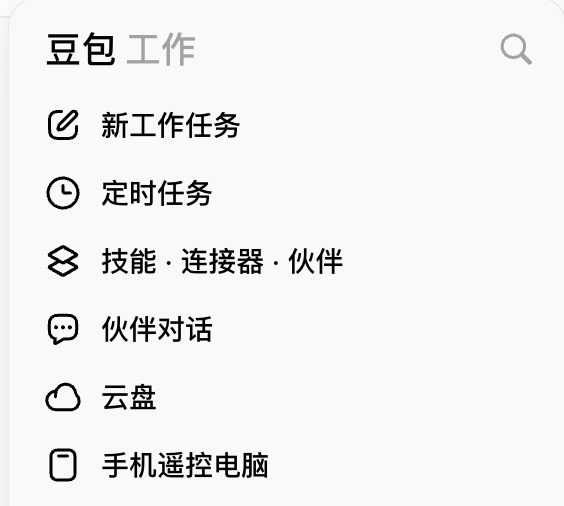
Screenshot: Doubao Work · left sidebar “Skills · Connectors · Partners”
Step 2: Click “New” in the top right, then install via chat
The top right of the skills page is “My skills” and ”+ New.” Click “New,” then pick “Create a skill by chatting with Doubao.” The same menu also has “Upload skill” and “New custom connector”; this time, chat install is enough.
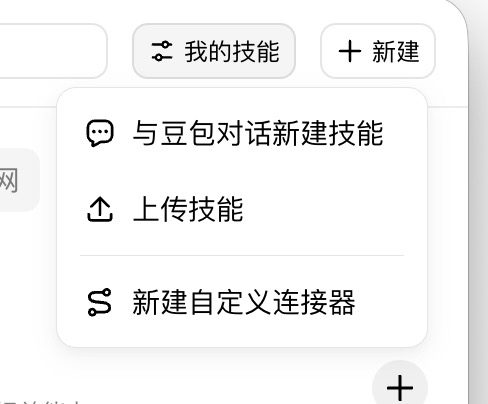
Screenshot: Doubao Work · top right “New” → “Create a skill by chatting with Doubao”
Step 3: Send Doubao this sentence (copy-paste ready)
Paste the line below into the chat and hit return. This is an install command, not small talk. The screenshot and the text are the same sentence, so you can copy against the picture:
新建技能 安装:https://github.com/JimmyLv/bibigpt-skill
Screenshot: Doubao Work · one-line install command (copy the text above)
Repo source: github.com/JimmyLv/bibigpt-skill. BibiGPT is not on the skill-store shelf yet. You install a GitHub skill pack in chat; it is not a store one-click.
Step 4: Sign in in the browser when prompted
During install or the first summary, a browser login page may pop. After a successful sign-in you will see the English prompt Login Successful. Close the window and return to Doubao Work. When the login expires, summarizing will walk this auth again.
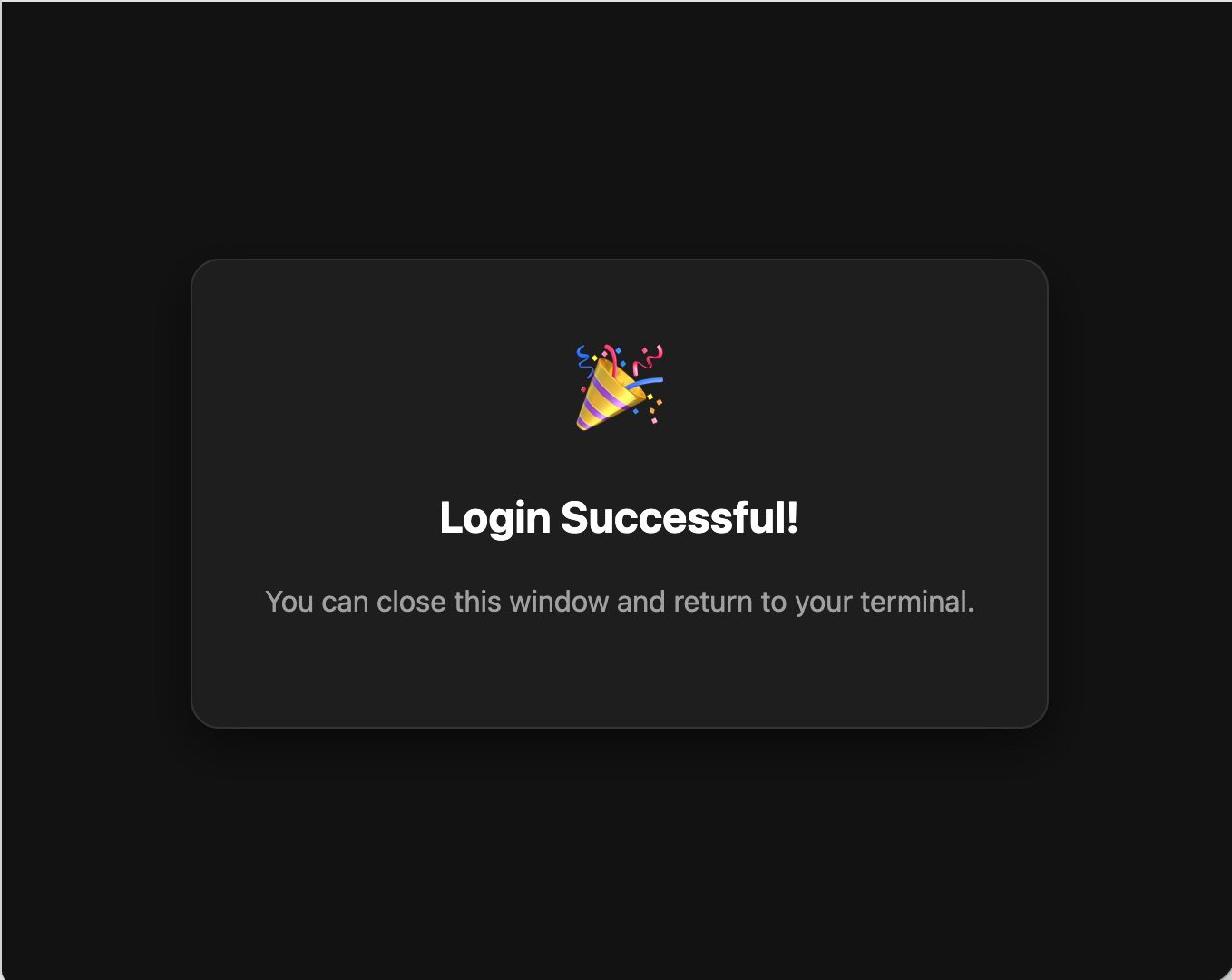
Screenshot: BibiGPT · browser login success page
Step 5: Confirm “bibi skill installed”
Doubao reports the install is done and lists the skill structure: instructions, reference docs, workflows (quick summary, deep analysis, caption extract, article rewrite, batch, and more), and an environment-check script. The skill name is bibi, installed in this machine’s Doubao Work user-skill directory. The next time the chat mentions “summarize video” or “extract captions,” it should fire on its own.
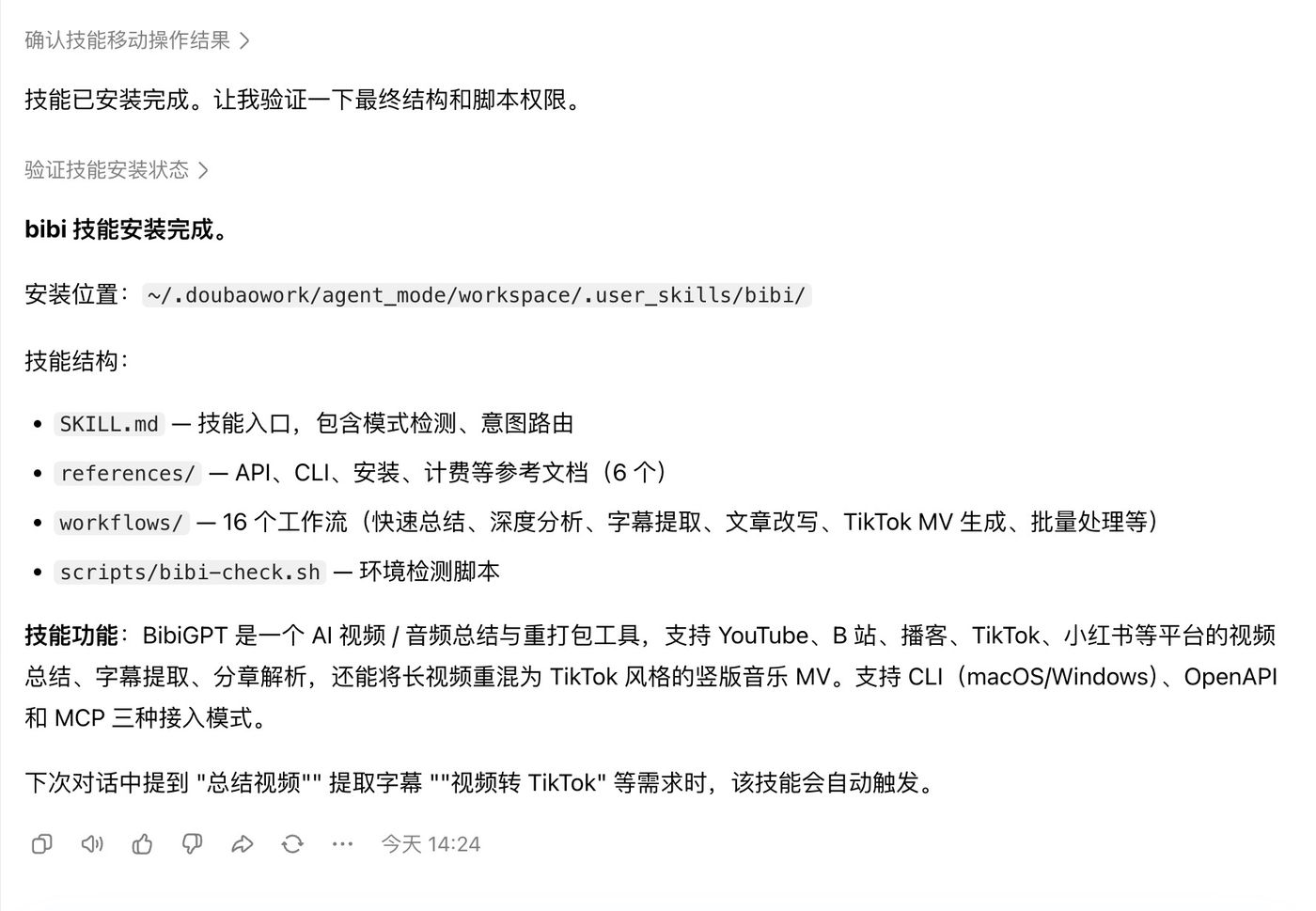
Screenshot: Doubao Work · bibi skill installed
Do not rush to search /bibi the second it finishes. Right after install, bibi may not show up in the slash-command list yet — a current Doubao Work quirk. Wait a bit, type / again, and it usually appears; they should fix this. In our tests, the bibi skill itself works. If you get stuck, tell us.
Step 6: Paste the video link you want summarized and run it
In the work-task chat, say it like this, and swap the tail for the video link you want summarized — a full URL is enough, no BV-id split, no platform flag:
/bibi 总结 https://你要总结的视频链接Bilibili, YouTube, Douyin, TikTok, Xiaohongshu, Xiaoyuzhou, and podcast links all drop in; local audio/video files work too. If it opens, it almost always summarizes. It first checks whether the desktop app is signed in, walks auth again if needed, then returns a structured summary with topics, core strengths, covered themes, and claims, and asks whether you want chapters, captions, or a rewrite into a WeChat official-account / Xiaohongshu image-text post. The shot below is a real run: an open-course video, a full summary inside Doubao Work.
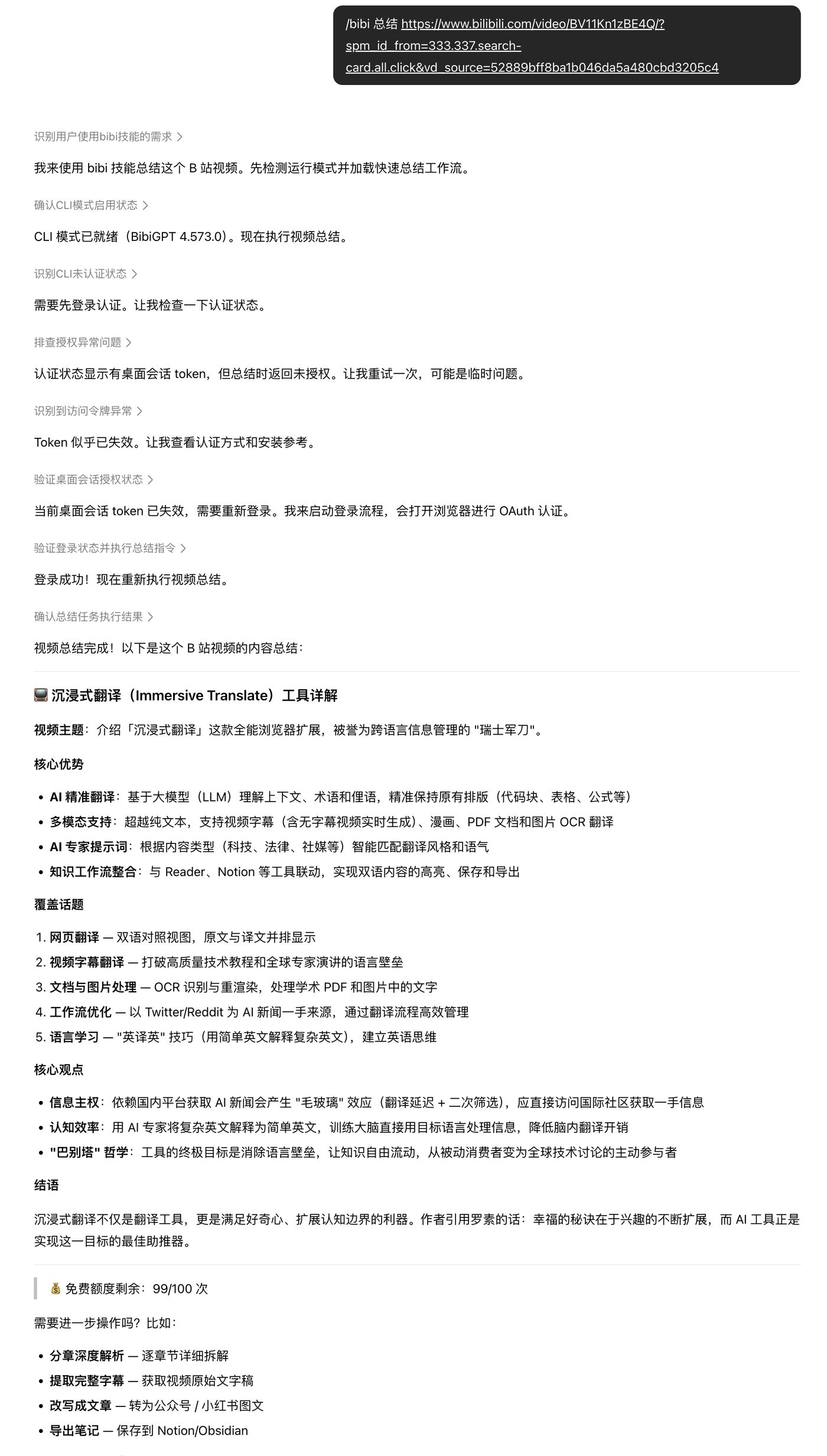
Screenshot: Doubao Work · hands-on result of summarizing a video link with the bibi skill
Step 7: The same result shows up on phone / Feishu
A skill installed on the computer syncs the summary into the “Doubao Work” chat in Feishu. Away from the desk, you can finish the summary first, then go back to the computer to rewrite it into a PPT or weekly report.
Once that loop runs, connectors keep owning Feishu docs, and work partners write the PPT — “watch video → get notes → hand it in” no longer needs a manual export every time.
Path 2: install bibigpt-skill on a local Agent, then hand output to Doubao Work
If you already run Claude Code, OpenClaw, or a similar local Agent, you do not have to force it into Doubao Work:
npx skills add JimmyLv/bibigpt-skill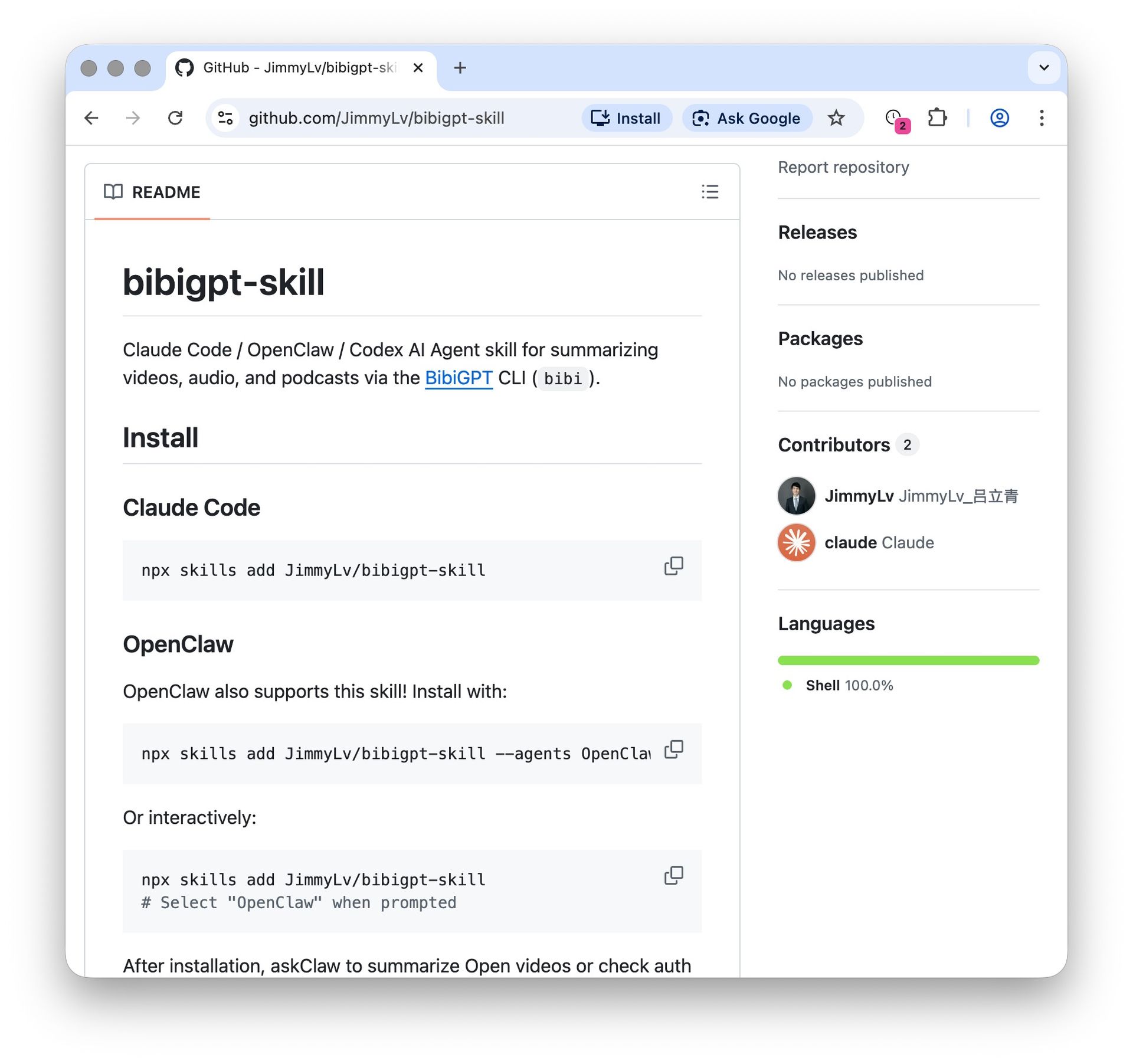
Screenshot: BibiGPT · bibigpt-skill repo install page
Once it is in, say “summarize this video” and paste the link. The Agent goes through the desktop app or the open API. When structured Markdown comes out, drop it into Doubao Work for PPT and scheduled distribution. Do not want a skill, and just want the old web-summary-then-export path? See the three-step manual workflow below. Finer commands and the platform list: OpenClaw + bibigpt-skill in practice. Keys and the open API live at aitodo.co/user/integration.
Practical rule: Doubao Work’s skills remember how to hand the work in. BibiGPT’s skills handle how to understand the video. Stack both. Do not expect one store to finish both jobs.
Official docs and install guides, in one place:
Doubao Work / Coze skills
- Product: doubao.com/work
- Skill overview
- Create a skill
- Develop a skill
- August 21 capability drop: IT Home
BibiGPT skills
- Repo: github.com/JimmyLv/bibigpt-skill
- Install and workflow: bibigpt-skill install guide
- Keys / open API: aitodo.co/user/integration
- Desktop (hands-on uses your local login): aitodo.co/download/desktop
What Doubao Work shipped: capability limits and a pricing snapshot
The short answer: Doubao Work is ByteDance’s standalone office Agent brand, formally launched on August 25, 2026. The site slogan is “A new work habit: let Doubao do it first”: you describe the goal, it splits tasks, calls tools, and keeps going. Download the standalone client from doubao.com/work, or use it inside the latest Doubao desktop app.
It is not TRAE Work in a new coat. TRAE Work was the June workbench for “people who do not write code”; Doubao Work is the office entry split off the Doubao trunk. If you are still searching “TRAE Work” this week, you mean today’s Doubao Work.
From the deep merge of the Feishu team with Coze and TRAE, to the August 25 brand launch, the beats are:
- Around July 30: the Feishu product team folded into the Doubao system (IT Home’s recap of the later integration).
- August 17–21: remote-control computer, virtual desktop, skill store, connectors, and work partners shipped in a row.
- August 24: the TRAE and Coze teams folded into Doubao; TRAE Work / Coze merged into the work scene, while TRAE IDE and CLI stayed as the coding line (36Kr report).
- August 25: the site and standalone client went live; the old enterprise-edition entry inside Feishu flipped to Doubao Work.
Doubao Work’s core capabilities sit on high-frequency desktop handoff jobs:
| Capability | How the site puts it | What it means for you |
|---|---|---|
| Documents and reports | Generate docs and tables, combining Feishu Docs and a local knowledge base | Proposals and weekly reports come out as files |
| PPT and data dashboards | Auto-build a deck from an outline | Handoff slides do not start from a blank page |
| Deep research | Search multiple sources, produce a research report | Long jobs: competitors, industry, topic selection |
| System-level ops and scheduled tasks | Read/edit local files, open pages, fill forms; the phone can dispatch remotely | Work keeps moving when you are away from the computer |
| Multimodal creative output | Images, plus video storyboards and finished cuts | Ads and explainer clips are output, not “understanding someone else’s video” |
| Skill library | Skill store + connectors + custom skills | Save repeat flows as reusable skills; chat-to-create, or one-line install of a GitHub skill pack |
On the personal side, per the official pricing page and AIHub launch coverage: besides the free tier, Standard is ¥68/month on auto-renew, Plus ¥200, Premium ¥500. Enterprise has a separate team edition fused with Feishu. Download, sign in, or upgrade and you may get a stretch of subscription benefits for free; go by whatever the site shows at the time.
The paid-plan notes also mention a “recording-notes quota.” That sentence matters. The next section splits it from public-web audio/video parsing — the former is a meeting-audio quota; the latter is paste a video link and get a structured summary.
Press filled in two points the homepage does not: dual environments, local PC and cloud PC; and after you sign in with a Feishu account, you can call chat history, docs, meeting notes, and calendar inside your permission scope. The Feishu join-up is the differentiator ByteDance itself stresses.
As an execution terminal tightly bound to an enterprise collaboration stack, Doubao Work’s position is sharp: finish the last-mile formatted handoff for knowledge workers.
Practical rule: To tell whether an office Agent is built for you, check whether it can take the inputs you actually have — not whether the monthly fee is ¥68 or ¥200, or whether it can make a PPT.
The core contrast: generating video is not the same as understanding it
The definition that matters: Doubao Work is an execution-and-delivery Agent built on a collaboration stack and system ops — it is good at finishing the job and shipping a cut. BibiGPT is a structured input layer for audio-video understanding, turning open-web public streams into high-quality, computable structured feedstock.
In daily use, many people treat “can generate video” as “can understand video.” The two differ in architecture and in the jobs they actually do:
| Dimension | Doubao Work (public capabilities) | BibiGPT (specialized input layer) |
|---|---|---|
| Video direction | Text → storyboard / video (generation) | Paste a Bilibili / YouTube / podcast link and extract summary, captions, and keyframes in one step (understanding) |
| Audio-notes scope | Feishu internal meeting recordings / local recording-file transcription quota | Any public audio/video URL, long podcasts, open-course deep structured extraction |
| Default inputs | A text goal, local docs, chat / calendar inside the org permission tree | Open-web public URLs (Bilibili / YouTube / Douyin / Xiaohongshu / Xiaoyuzhou / web pages, etc.) and multi-format audio/video |
| Deliverable shape | PPT, online docs, automation scripts, finished video | Structured Markdown, mind maps, timestamped keyframes, longform image-text |
Why built-in “recording notes” cannot replace web audio-video parsing
The paid plan puts recording notes on the quota list, which means ByteDance admits office work has a “listen” layer. It solves: how much quota it costs to turn this internal meeting or local recording into notes. It does not solve: a link still sitting on Bilibili, YouTube, or a podcast platform, auto-chaptered, keyframed, laid out as image-text, and exported to an Agent.
In the real job, when you face a two-hour Bilibili open course, an overseas YouTube tech keynote, or a Xiaoyuzhou business podcast, you do not just need tens of thousands of words of raw transcript. You need:
- Smart chapters and core-point extraction;
- Precise screenshots of course-deck keyframes and data boards;
- Structured Markdown and mind maps you can rework immediately.
That is the moat of a dedicated audio-video understanding tool, and the missing pre-input step for a general office Agent. Putting “make video” in the pitch makes people think it understands video. At work you more often need the other face: watch this class, this keynote, this customer demo for me. The entry looks like this — a link in, not a prompt that generates a cut:
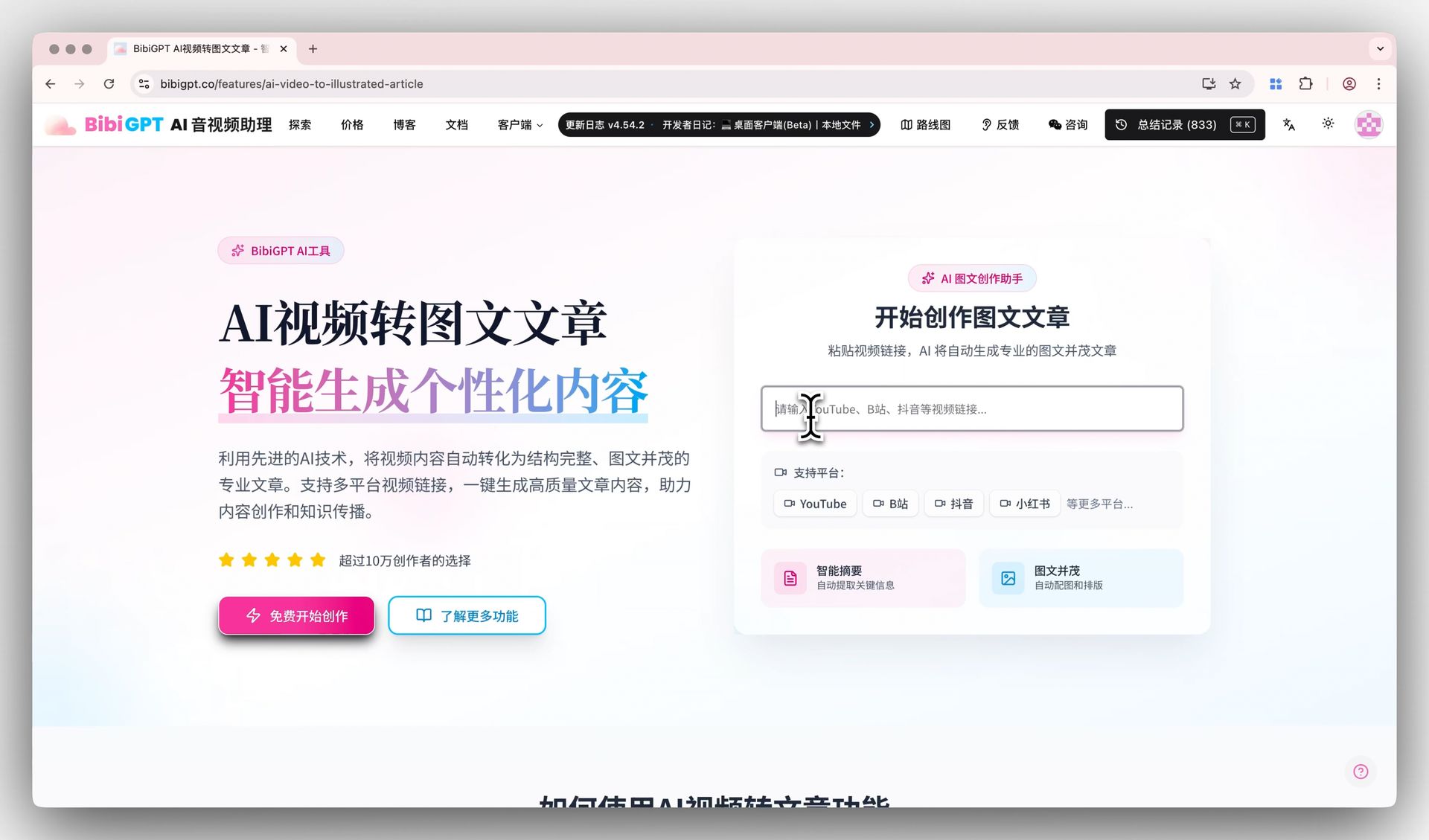
Screenshot: BibiGPT · paste a video link for an AI video summary
In the same cluster we already wrote WorkBuddy’s edge: What WorkBuddy still cannot do today. Doubao Work’s board is fuller, especially Feishu and shipping a cut, but all three still default to “give the Agent text and files first, then let it work.” The evergreen workflow: How to feed audio and video to an office Agent.
Practical rule: An office Agent that lists “make video” as a selling point is not the same as one that can watch someone else’s video for you.
What this means for three kinds of people
The short answer: Switching the entry solves “where you hand the work in.” The missing piece is video outside the permission tree. The three groups leak different things, and none of them get fixed by rereading a feature list.
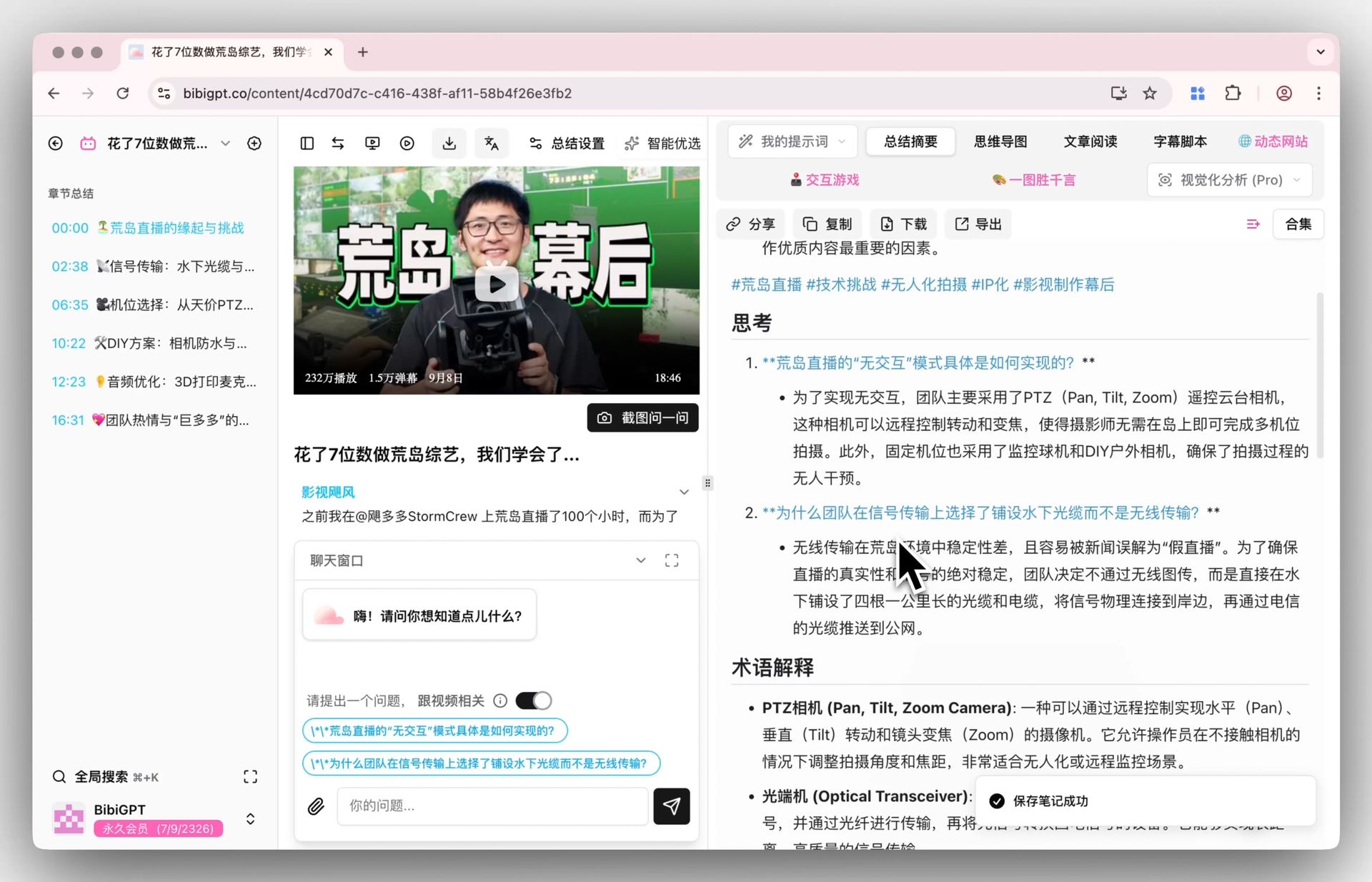
Screenshot: BibiGPT · deep summary and follow-up questions
1. Deep enterprise collaboration workers
Internal calendars, meetings, and docs already move inside the org permission tree. What actually gets missed is the industry-share video or competitor-pitch recording dropped in a WeChat group or an external thread. An office Agent cannot digest public-web video for you; you have to turn that external video into structured notes first.
Laxis State of Meetings 2026 puts it at 21.7 meetings a week for knowledge workers, about 30% of the work week. Those 21.7 are the ones on the calendar. Public-web video is not in the 21.7, and it often decides whether next week’s proposal even gets written.
2. General content creators and independent media
Doubao Work can shrink the copy-to-finished-video cycle by a lot. Early-stage “tear down a benchmark account” and “research industry podcasts” still need a fast read across a pile of videos, so you can pull viral-script structure before the Agent lays out and ships the cut. For that watch-and-understand step, AI video to illustrated article is a better fit than forcing generation inside an office Agent.
3. Students and self-learners
Tens of hours of open courses and skill tutorials in Watch Later cannot be “thrown at an Agent so I learn it.” The faster path is to build a knowledge spine first with video-to-article and mind maps, then use the Agent for drills and cleanup on the hard concepts. Swapping the entry from TRAE Work to Doubao Work does not help Watch Later.
Practical rule: Before you ask “should I switch to Doubao Work,” ask what actually ate your week: the meetings in Feishu, or the videos in Watch Later.
Don’t want to install a skill: a three-step manual workflow
The short answer: They are not substitutes. They are sequential. BibiGPT turns “listen and watch” into timestamped structured text; Doubao Work takes that text and writes the proposal, builds the PPT, and sets the scheduled task. Skip the skill install, summarize on the web, export, and you can do this today.
┌────────────────────────────────────────────────────────┐
│  输入源:B 站网课 / YouTube 发布会 / 行业播客 / 会议录像   │
└──────────────────────────┬─────────────────────────────┘
                           │ (贴入 URL 链接)
                           ▼
┌────────────────────────────────────────────────────────┐
│           【BibiGPT AI 音视频理解层】                    │
│  • 智能分章节摘要  • 课件关键帧截取  • 导出 Markdown/PDF  │
└──────────────────────────┬─────────────────────────────┘
                           │ (输出结构化文本与要点)
                           ▼
┌────────────────────────────────────────────────────────┐
│           【豆包工作 / 办公 Agent 交付层】                │
│  • 自动化制作 PPT  • 生成立项报告  • 执行定时分发任务      │
└────────────────────────────────────────────────────────┘
Step 1: extract takeaways from public-web audio and video in one click
Paste a Bilibili, YouTube, or podcast link into BibiGPT AI video summary, pick “Minimal summary” or “Video to illustrated article,” and generate a timestamped chapter outline plus core claims.
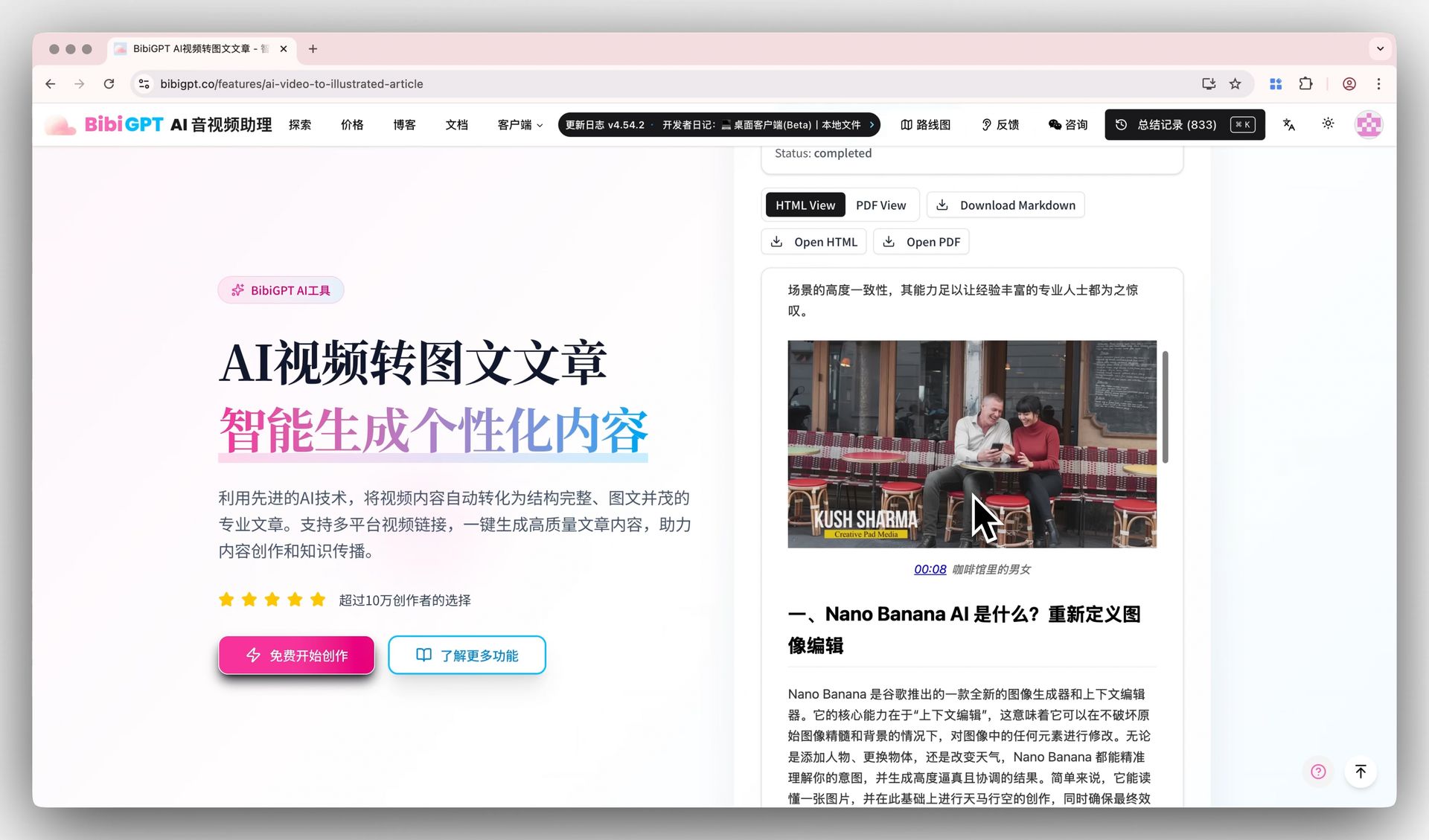
Screenshot: BibiGPT · video-to-article export
Step 2: extract PPT keyframes and board writing
For keynotes, product demos, or open courses, turn on Video to PPT / keyframe extraction to grab the speaker’s page-turns, core frames, and charts — no more pause-and-screenshot. For competitor-intel jobs, see: Competitive intel with video summaries.
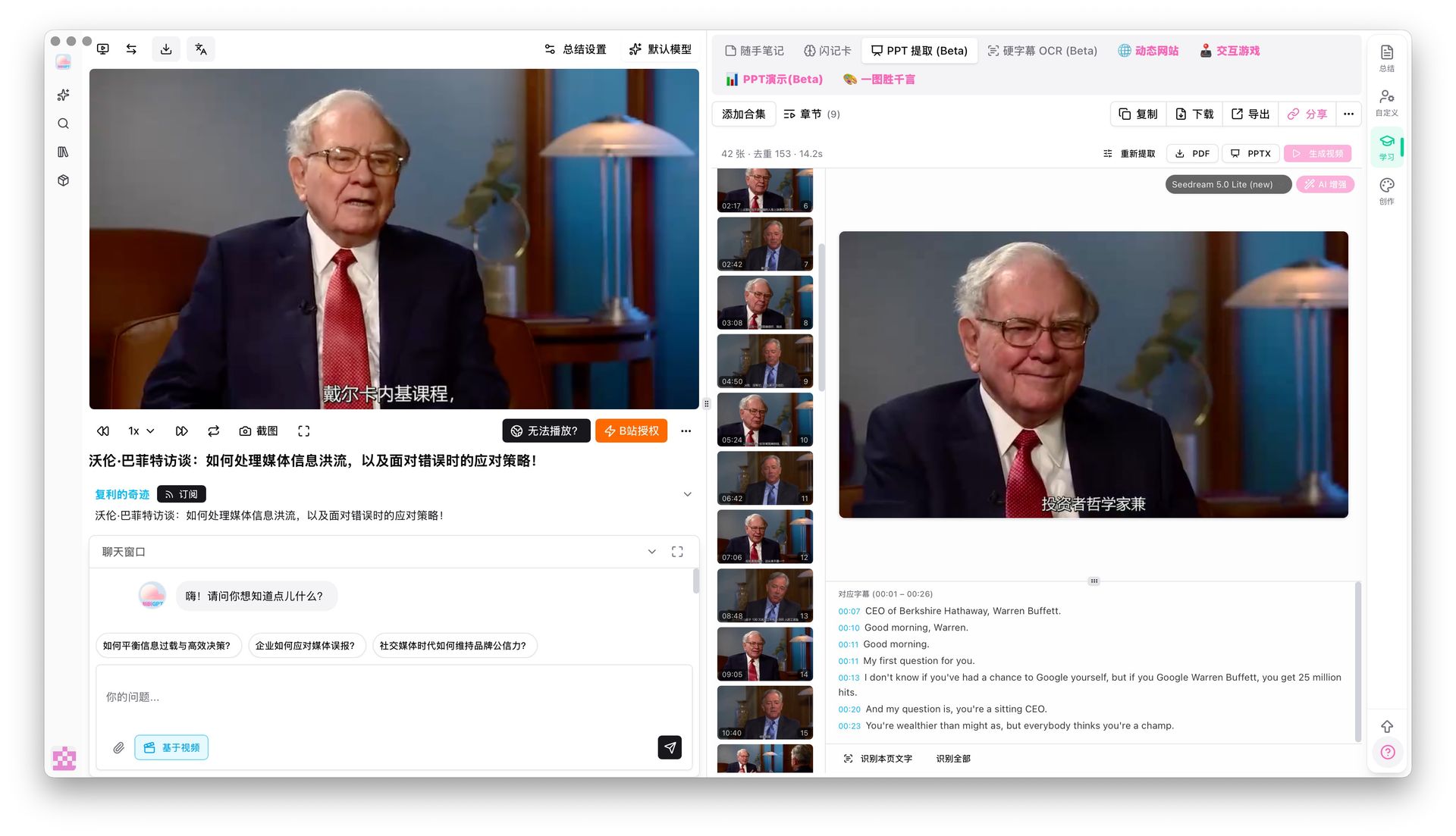
Screenshot: BibiGPT · video keyframe extraction
Step 3: export structured text, then let Doubao Work automate the handoff
In BibiGPT, export Markdown or a plain-text file, feed it to Doubao Work as high-quality material, and give a direct instruction:
请根据这份行业分析要点,按照公司周报规范生成 5 页结构完整的汇报 PPT,并提取其中的待办事项。Still comparing note tools in this cluster? Get the cut first: BiliNote vs BibiGPT.
Want the feel of “one video in, structured takeaways out”? The demo below is the same job as the flow in this piece:
Video source: YouTube · BibiGPT product demo
Practical rule: Summarize first, then decide whether to watch — spend five minutes on a summary to make a two-hour viewing investment decision.
Manual export is already enough. Want Doubao Work to summarize the video itself? Go back to the install steps.
Industry note: the entry war is settled; the input layer decides efficiency
The short answer: From Tencent WorkBuddy and Alibaba’s Qwen Office to ByteDance’s Doubao Work, the big vendors’ bets on a desktop-office “default entry” are mostly in place. On general office suites and system ops, feature-list sameness is the expected end state.
What still caps an office Agent’s output quality is always how precise and dense the input feedstock is. A general model cannot understand the latest public-web streams from generic training data alone, and it cannot invent the newest chart from an industry keynote. ByteDance’s “ship video” move does not shrink the input gap; it makes “can make ≠ can watch” clearer.
Three claims you can hold us to:
Claim 1: By June 1, 2027, if Doubao Work, WorkBuddy, and Qwen Office still cannot natively produce an exportable structured summary from a Bilibili / YouTube URL on their official capability pages (no third-party skill), the default workplace path of “watch video → hand it in” will stay two-stage. On that date, check each vendor’s official capability page.
Claim 2: Over the next 12 months, office Agents are more likely to plug in an external audio-video conversion layer than to grow their own cross-platform captions and provenance stack. That view overlaps with our position as an audio-video tool; read it with that conflict of interest in mind.
Claim 3: “Summarize first, then decide whether to watch” will replace “watch first, then organize.” When a five-minute summary can make a two-hour viewing decision, behavior flips.
A clear industry call: until a general office Agent can understand cross-platform audio and video on its own, the two-stage pairing of “specialized audio-video understanding tool (input layer) + office Agent (execution layer)” remains the stable way for knowledge workers and creators to keep their speed.
FAQ: Doubao Work and the audio-video workflow
Q1: Is Doubao Work just a renamed TRAE Work?
A: Not a simple reskin. TRAE Work was the dual-mode workbench upgraded from TRAE SOLO in June 2026; Doubao Work is the standalone office brand split off the Doubao trunk on August 25, folding code, docs, workflows, and the Feishu stack into a general office entry. TRAE Work’s work-scene capabilities merged into Doubao; TRAE IDE and CLI stayed as the coding line. Old-entry map: What ByteDance TRAE Work is.
Q2: Can Doubao Work summarize Bilibili and YouTube links directly?
A: Not by default. As of the 2026-08-26 official capability page, the main path is PPT, docs, tables, computer ops, and creative generation — there is no “paste a video link and get a structured summary.” You can install bibigpt-skill into Doubao Work as above: send 新建技能 安装:https://github.com/JimmyLv/bibigpt-skill in chat, then use /bibi 总结 plus the video link you want summarized. Bilibili, YouTube, Douyin, Xiaohongshu, and podcasts all use the same line. Skip the skill and you can still run BibiGPT free video summarizer first, then feed it the text.
Q3: How do Feishu meeting notes differ from a BibiGPT summary?
A: Feishu meeting notes focus on live transcription of internal online meetings, and Doubao Work can call them after a Feishu login. BibiGPT focuses on understanding public content across platforms (Bilibili, YouTube, podcasts, Xiaohongshu, and more), smart chapters, course-deck keyframes, and image-text reconstruction. One handles “information already in Feishu.” The other handles “information still on a video site.”
Q4: I already use WorkBuddy or Qwen Office. Do I still need to watch Doubao Work?
A: It depends on your core office stack. If you live in Feishu docs and collaboration, Doubao Work’s context join-up will feel smoother; WeCom / Tencent Docs teams should read WorkBuddy; DingTalk stacks look at Qwen Office. Whichever Agent you use, the logic of pre-processing external audio-video feedstock is the same.
Q5: How do I try the structured audio-video extract-and-deliver workflow?
A: Open the BibiGPT web app or use the browser extension, paste any video link for a structured summary, and copy it into your office Agent in one click. Full steps are in “Don’t want to install a skill: a three-step manual workflow” above. Want to summarize inside Doubao Work itself? Use “How to connect BibiGPT to Doubao Work.”
Q6: Does Doubao Work support Skills? Can I install BibiGPT directly?
A: Skills are supported. From August 21, the sidebar has “Skills · Connectors · Partners”: you can install official skills, or create a skill in chat. BibiGPT’s bibigpt-skill can go in, but as of 2026-08-26 it is not a one-click tile on the skill-store shelf. On desktop, click “New” → “Create a skill by chatting with Doubao,” then paste 新建技能 安装:https://github.com/JimmyLv/bibigpt-skill. After that, use /bibi 总结 plus a video link. Step-by-step screenshots are in “How to connect BibiGPT to Doubao Work” above.
Q7: After installing the skill, why is /bibi missing from the chat?
A: After install, /bibi sometimes does not show up in the slash-command list right away. That is a current Doubao Work quirk. Wait a bit, type / again, and it usually appears; they should fix this. In our tests the bibi skill works. If you hit something else, tell us.
Don’t chase every office entry point. Chase whether the input layer is filled in: can the course in Watch Later become text an Agent can actually read.
Open BibiGPT and turn Bilibili courses and keynotes into usable text
Open BibiGPT now — turn video into feedstock you can hand in:
- 🌐 Website: https://aitodo.co
- 📱 Mobile: https://aitodo.co/app
- 💻 Desktop: https://aitodo.co/download/desktop
- ✨ Free video summarizer: https://aitodo.co/features/free-video-summarizer
BibiGPT Team
Popular tools
More in this series
- Adobe Acrobat Student Spaces vs BibiGPT: Two Paths to Turn PDFs and Videos into AI Podcasts (2026 Student AI Study Comparison)
- AI Haoji vs BibiGPT 2026 Full Comparison: Use Case, Platform Coverage, Multilingual, Mind Map Depth, Pricing — Which Should You Pick?
- AI PPT Generator Tools Comparison 2026: Qwen vs Gamma vs BibiGPT vs Tome — Which Is Right for You?
- AI Video Note Taker Comparison 2026: QuickQuill vs Mufal vs Memories.ai vs BibiGPT
- Ask YouTube's Conversational AI Search Rolls Out Wider This Summer: Can It Replace Video Summary Tools? (2026 Hands-On Review)